Building a CRM with HyphaBase · Episode 6
How to Securely Update and Delete Records in Next.js Using TypeScript
Add edit and delete to a Next.js app with TypeScript, with the permission checked on the server for every request and not by hiding a button.
Our CRM is finally starting to look like a real application.
We've provisioned a database, created a Customers collection, set up sign-in and roles, and put a Next.js frontend on top of it.
We can sign in, see our customers and add a new one.
Not bad.
There's just one problem.
Apparently, customers sometimes change their phone numbers. Who knew?
And every now and then a record has to go altogether. Somebody adds a test customer. It happens. It happened to us in episode 4, and it's about to happen again.
So in this article we add editing and deleting to the CRM. We also get to the part that matters more than either button: just because someone can see a customer doesn't mean they should be allowed to delete one. The code is in the series repository.
Who gets to do what?
Edit and delete are the first two actions in our CRM that can damage data that's already there. So before we draw a single button, there's a question to answer.
Brightside Cleaning has two people in the app. Sarah owns the business. Marcus is on staff.
Whoever answers the phone needs to be able to fix a number, so Marcus should be able to edit. Removing a customer is rarer, and it's harder to take back, so that one stays with Sarah.
| See customers | Add | Edit | Delete | |
|---|---|---|---|---|
| Owner (Sarah) | Yes | Yes | Yes | Yes |
| Staff (Marcus) | Yes | No | Yes | No |
That's a change from episode 4, where Staff could only look. Roles change as an app grows, and ours just did.
In HyphaBase the difference between the two roles is a list of permissions. Editing a record needs data.records.update. Deleting one needs data.records.delete. Staff gets the first and not the second:
export const ROLES = {
  owner: { name: "Owner", permissions: [CAN.readCustomers, CAN.addCustomers, CAN.updateCustomers, CAN.deleteCustomers] },
  staff: { name: "Staff", permissions: [CAN.readCustomers, CAN.updateCustomers] },
};
We already had both roles from episode 4, so our setup script now adds whatever an existing role is missing. One command, and Marcus could edit:
$ npm run roles:setup
Updated role Owner
  data.records.read
  data.records.create
  data.records.delete
  data.records.update
Updated role Staff
  data.records.read
  data.records.update
We didn't deploy anything, and Marcus didn't have to sign in again. Our server asks HyphaBase what a person may do on every request, so his very next request was allowed.
Editing a customer
The architecture is the one from last time. The pages run in the browser and hold no key and no token. They call our own Route Handlers, and those hold the secret key and talk to HyphaBase.
An edit is a PATCH to our own server, and it carries only what changed:
PATCH /api/customers/0df9f979-555f-4adf-8e88-066371e5cfce

{ "phone": "555-0124" }
The Route Handler is three lines, like the others:
export async function PATCH(request: Request, { params }: Context) {
  const { id } = await params;
  const body = await bodyOf(request);
  return respond(request, (crm, session) => crm.updateCustomer(session, id, body));
}
The work is in updateCustomer. Here it is without its error handling:
const user = await requirePermission(session, CAN.updateCustomers);   // 401 or 403
if (!CUSTOMER_ID.test(id)) throw noSuchCustomer();                    // 404

const parsed = parseCustomerChanges(input);                           // 422, one message per field
if (!parsed.ok) throw refuse(422, { error: "Check the highlighted fields.", errors: parsed.errors });

const customer = await customers.update(id, parsed.changes);          // as the server
The order is the point.
The role is checked first. Someone who isn't allowed to edit learns nothing from trying. They don't find out whether the id exists, or whether their input was valid.
Then the id. Record ids are UUIDs, so anything that isn't shaped like one can't be a customer, and we answer 404 without asking HyphaBase at all.
Then the input. An edit may carry any of the four fields we defined in episode 2: name, email, phone and status. Each field that was sent gets the same check and the same message it gets on a new customer. Fields that weren't sent keep their value. Anything else the browser sends is dropped, so nobody edits a field we never meant to expose.
if (raw.name !== undefined) changes.name = check.name(raw.name, errors);
if (raw.email !== undefined) changes.email = check.email(raw.email, errors);
if (raw.phone !== undefined) changes.phone = check.phone(raw.phone, errors) || null;
if (raw.status !== undefined) changes.status = check.status(raw.status, errors);
Only then does the secret key get used. With the SDK, the update itself is one call:
await customers.update(id, { phone: "555-0124" });On screen, Sarah clicks Edit next to Dana Whitfield, whose number has been wrong since episode 2:
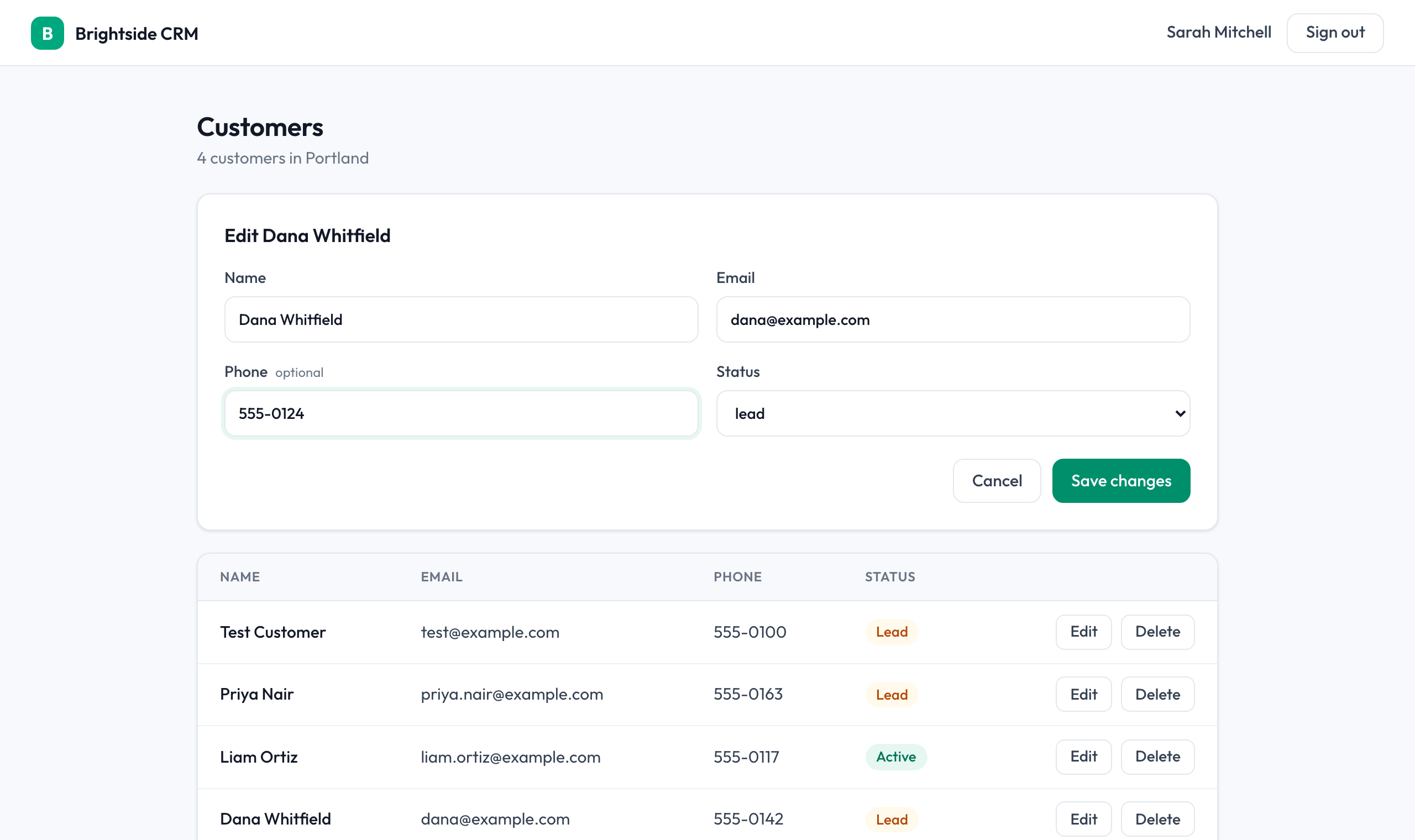
She saves, and the row has the new number. No page reload.
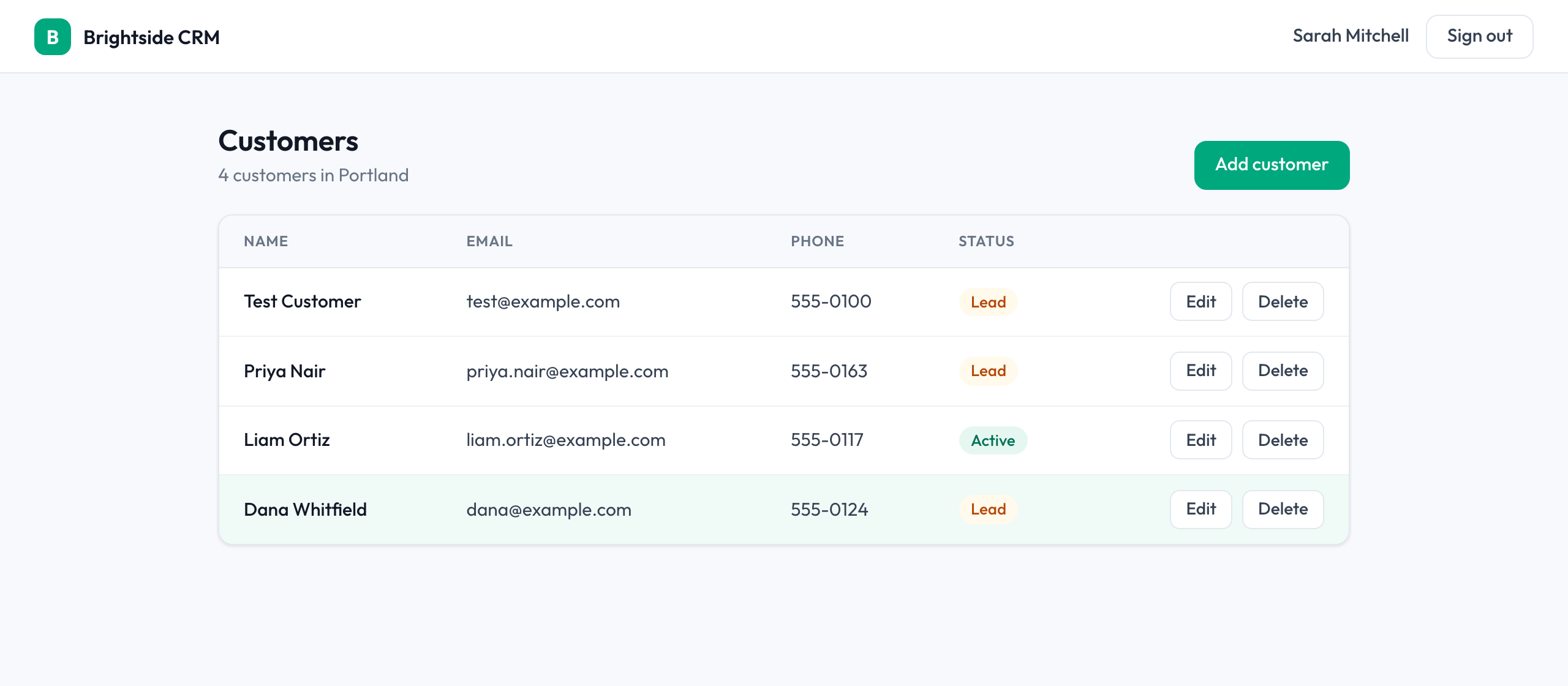
The form sends only the fields she changed. That's on purpose. If Sarah fixes a phone number while Marcus changes the same customer's status, neither save undoes the other.
Deleting a customer
We actually wrote the delete route last episode. It was tested, and it had no button. Now it has one.
On the server it's the same two checks, then one call:
const user = await requirePermission(session, CAN.deleteCustomers);
if (!CUSTOMER_ID.test(id)) throw noSuchCustomer();

await customers.delete(id);
On the screen, Delete asks first. No modal, just the row itself changing its mind:
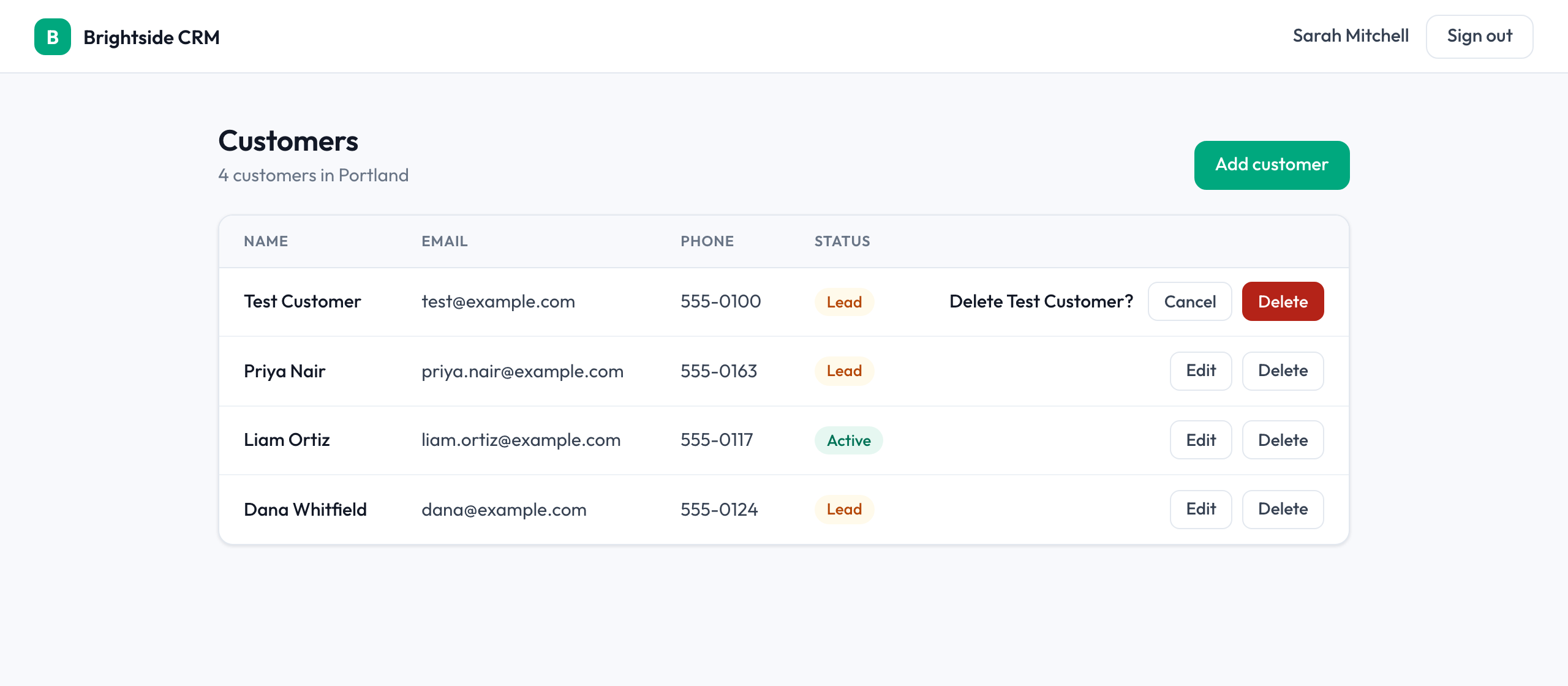
Confirm, and the row goes. It leaves the table only after the server has answered 204. If the delete is refused or fails, the row stays put and the reason shows above the table.
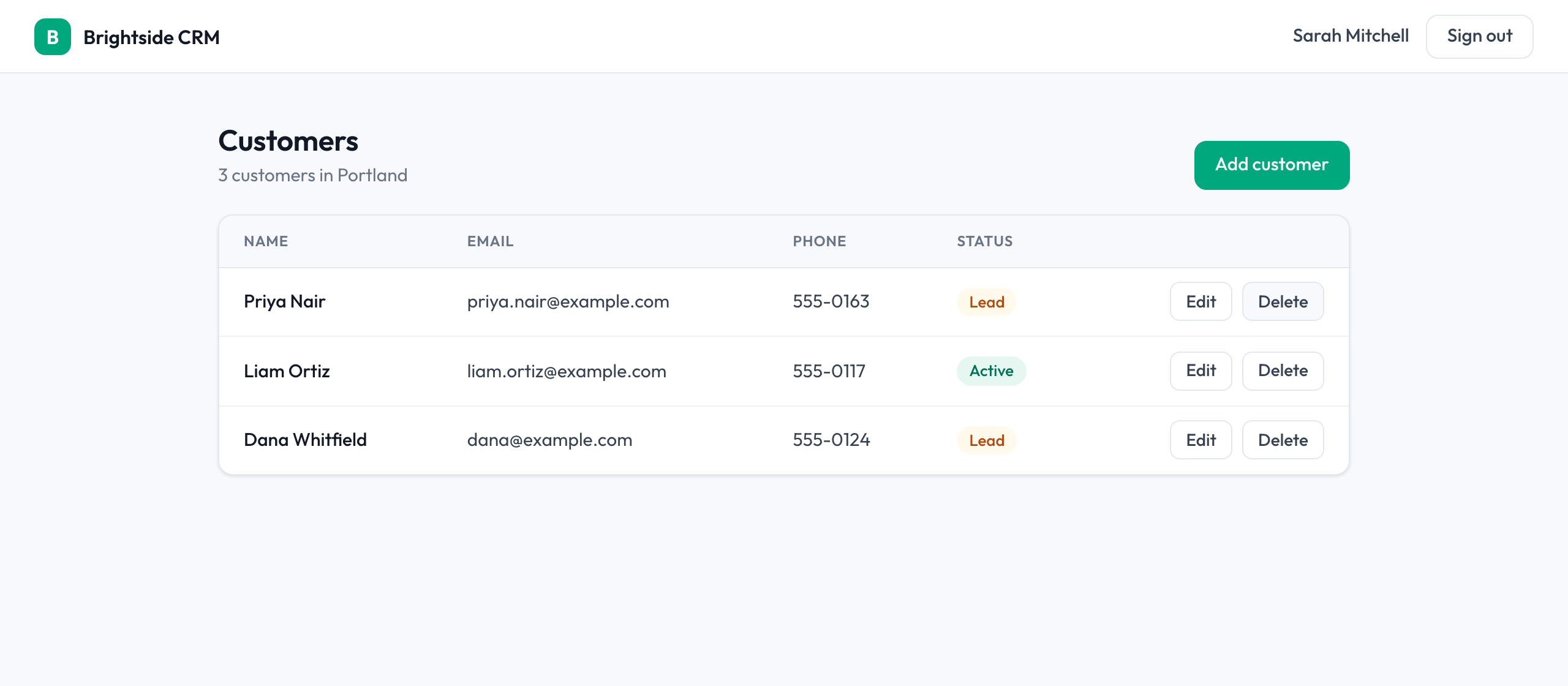
One thing worth knowing: in HyphaBase this is a soft delete. The record is marked as deleted and stops coming back in lists, and it isn't erased right away. The SDK has a restore for it. Our CRM doesn't offer an undo yet, so for Sarah the customer is simply gone.
Why hiding the Delete button isn't enough
Here's where it gets interesting.
When Marcus signs in, he has Edit on every row and no Delete:
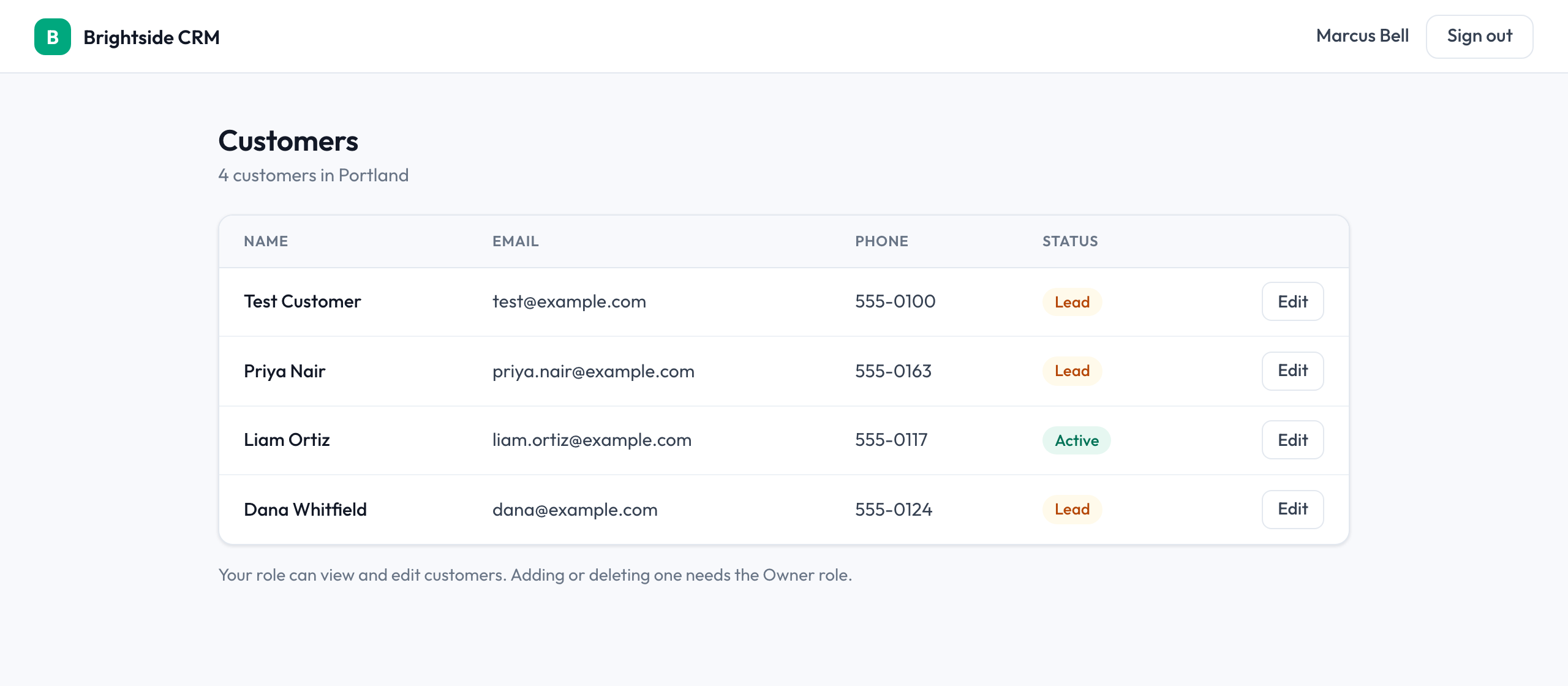
The button is shown when a person's permissions include data.records.delete, and his don't. That's good manners. Nobody likes clicking a button to be told no.
It isn't security, though. The page runs on Marcus's computer. He can open the browser's console and send the request himself, no button required:
await fetch("/api/customers/0df9f979-555f-4adf-8e88-066371e5cfce", { method: "DELETE" })If our server took that request and used its secret key, Marcus would have just deleted Dana. The key can delete anything. It has no idea who Marcus is.
So we tried it. This is what came back:
{
  "error": "Your role does not allow this.",
  "required_permission": "data.records.delete"
}
That's a 403, and Dana is still in the list. The server's log kept a note of it too:
marcus@brightsideclean.example was refused: no data.records.delete
delete customer 403
The function that did the refusing is the same one from episode 5. It's seven lines:
async function requirePermission(session: SessionStorageAdapter, permission: Permission): Promise<Person> {
  const { user, permissions } = await identify(session);
  if (permissions.includes(permission)) return user;

  log(`${user.email} was refused: no ${permission}`);
  throw refuse(403, { error: "Your role does not allow this.", required_permission: permission });
}
Notice what isn't in there. There's no if (role === "owner") anywhere in our server. It never asks what someone's role is called. It asks whether they hold the permission the action needs. The whole of "staff can edit but not delete" is one permission the Staff role doesn't carry.
Same route, different people, different answers. The button was never what protected Dana.
Does it hold up?
As before, we'd rather test this than promise it. The repository has unit tests that run without a network, and a smoke test that builds the app, starts it and talks to it the way a browser would, against a real environment. New this episode, it checks each of these:
- a staff user edits a customer and gets a
200 - an edit with a bad email is refused with a
422and a message for that field - an edit with no fields in it is refused with a
422 - a staff user's delete is refused with a
403that namesdata.records.delete, and the customer is still there afterwards - an owner changes a status and clears a phone number, and the staff user sees the change
- changing an email to one another customer already has is refused with a
409 - an owner deletes the customer and gets a
204, and it's gone for everyone - deleting or editing it a second time gets a
404 - with no cookie at all, editing and deleting both get a
401
What this doesn't cover yet
If two people edit the same field of the same customer at the same moment, the last save wins and nobody is told. Sending only the changed fields makes that rarer. It doesn't make it impossible.
There's no undo for a delete on the screen, and no list of deleted customers, even though the record can still be restored through the SDK.
The line in the server's log is the only record of who changed what. It says who and which customer. It doesn't say what the old phone number was.
Both of our users belong to one location, Portland. Brightside has a second one in Salem, and we haven't put a customer in it yet, so this episode doesn't show anything about keeping one location's staff out of another's records. We'll get there when Salem gets customers.
And if you want to run this yourself, the HyphaBase sandbox is free but open by invitation for now. You can join the early-access list at hyphabase.com and we'll send you a code.
Frequently asked questions
How do I update a record in a Next.js Route Handler?
Export a PATCH function from app/api/<resource>/[id]/route.ts. Read the id from params and the changes from the request body. Check who's asking and what they may do before you validate the body or touch your data.
Should I use PATCH or PUT to update a record?
We use PATCH, because it means "change these fields and leave the rest alone". PUT replaces the whole record. With PATCH, two people changing different fields of the same record don't overwrite each other.
Is hiding a button enough to stop someone deleting a record?
No. Anything in the browser can be bypassed by sending the request directly. Hide the button so people aren't offered things they can't do, and check the permission on the server every time anyway.
What's the difference between a 401 and a 403?
401 means we don't know who you are, so sign in. 403 means we know exactly who you are and the answer is still no. We covered the difference in authentication vs. authorization.
Why check the role before validating the input?
So a person who isn't allowed to do something learns nothing by trying. If validation ran first, anyone could probe your API for which ids exist and which values are accepted.
What is a soft delete?
The record is marked as deleted and hidden from normal reads, and it isn't erased straight away. That leaves room to restore it after a mistake. Whether you show an undo to your users is up to your app.
Can I let staff edit some fields and not others?
Not with what we built here. Our Staff role can edit all four customer fields or none. You could add that rule in the same place we validate the input, by refusing fields the person's permissions don't cover.
Next in the series
The CRM can now create, read, update and delete customers, and it knows who's allowed to do each.
But imagine a few thousand customers instead of three. Are we really going to scroll through every one of them to find Dana?
Probably not. Next we add search, filtering and paging to the customer list.
New here? The series starts with database per tenant vs. shared database.