Building a CRM with HyphaBase · Episode 4
Role-Based Access Control in SaaS: A Practical CRM Example
What RBAC is and how to enforce it on the server. We add an Owner and a Staff role to a real CRM, then watch a delete request get refused with a 403.
Our CRM has customers. Users can sign in.
Now we need to answer a slightly uncomfortable question: should every signed-in employee be able to delete all the customer records?
Probably not.
This is where role-based access control, or RBAC, comes in. In this article we explain what it is, look at where the check has to live, and then add two roles to the CRM we've been building. By the end, one person can delete a customer and another gets a 403 for trying. The code is in the series repository.
What is role-based access control?
In RBAC you define roles, attach permissions to those roles, and give each user the roles they need. You don't keep a separate list of permissions for every person. You describe a few jobs, and people get the job that fits.
There are three pieces.
| Piece | What it is | In our CRM |
|---|---|---|
| Permission | One action on one kind of thing | data.records.delete |
| Role | A name and a list of permissions | Owner, Staff |
| Assignment | Which user has which role | Sarah is an Owner, Marcus is Staff |
When a request comes in, the server works out who is asking, looks up what their roles allow, and compares that with what the request needs. If the permission is there, the request goes ahead. If it isn't, the answer is 403.
In the last episode we separated authentication from authorization. Authentication told us who is asking. RBAC is one common way to do the second half.
Start with the jobs people actually have
It's tempting to design a big permission matrix on day one. We'd hold off. Two roles you can explain in one sentence each are better than twelve nobody can remember.
Our CRM belongs to Brightside Cleaning, a fictional home cleaning company. It has two people:
- Sarah Mitchell owns the business. She can view, add and delete customer records.
- Marcus Bell works with customers. He can view them, and that's all.
That's deliberately small. We want one boundary to be obvious before we add more.
In the code, both roles are plain data:
export const CAN = {
  readCustomers: "data.records.read",
  addCustomers: "data.records.create",
  deleteCustomers: "data.records.delete",
};

export const ROLES = {
  owner: { name: "Owner", permissions: [CAN.readCustomers, CAN.addCustomers, CAN.deleteCustomers] },
  staff: { name: "Staff", permissions: [CAN.readCustomers] },
};
The permission names are HyphaBase's own. If you put one in a role that doesn't exist, the API refuses the role.
Where the check has to live
Hiding the Delete button for Marcus makes for a nicer screen, but it isn't authorization. Anyone can skip the screen and send the request themselves. The rule has to be enforced by the server that serves the data.
Our CRM doesn't even have a screen yet, so there's no button to hide. That turns out to be useful. The only thing standing between Marcus and a deleted customer is the server, which is how it should be.
There's a second decision to make: where do the roles live? You could write a roles table and an "is admin" column yourself. We're not doing that. HyphaBase stores the roles, their permissions and who has which role. Our server asks it one question on every request: what may this person do?
So this repository has no roles table and no list of admin emails in the code.
Build it: an Owner and a Staff role
There's just one small problem before we start. Somebody added a test customer by mistake, and it's sitting in the list between two real ones.
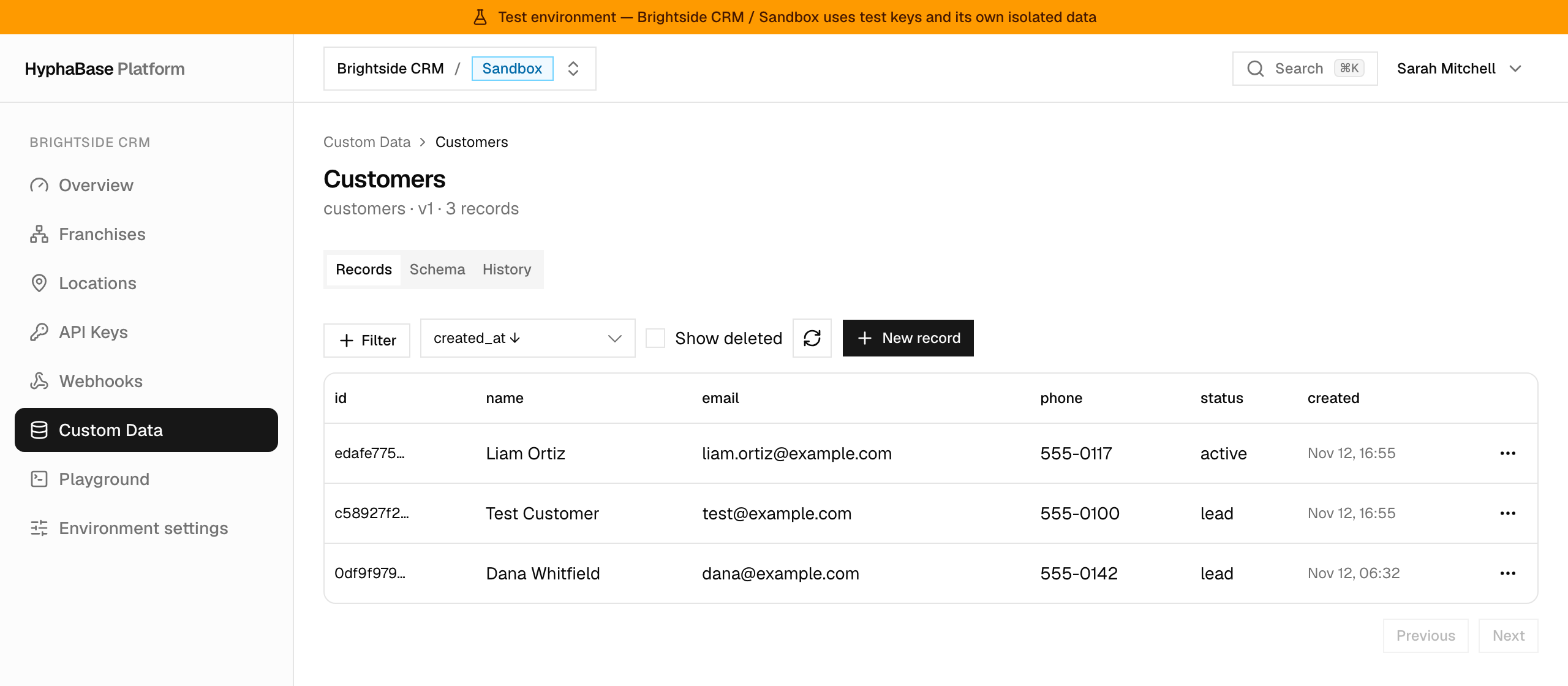
Someone should be able to remove it. Not everyone should.
A new user can do nothing
Marcus gets an account the same way Sarah did in episode 3. He signs in, and then we ask the CRM what he's allowed to do:
$ npm run crm:me
Signed in as Marcus Bell <marcus@brightsideclean.example>.
No role yet, so nothing is allowed.

$ npm run crm:customers
403 Your role does not allow this.
In episode 3, that last command returned every customer. Now a person with no role gets nothing. We like this default, because forgetting to give someone a role fails safely.
Create the roles and hand them out
Two commands, both run with the secret key, so only we can run them:
$ npm run roles:setup
Created role Owner
  data.records.read
  data.records.create
  data.records.delete
Created role Staff
  data.records.read

$ npm run role:give -- --email sarah@brightsideclean.example --role owner
Sarah Mitchell now has the Owner role:
  data.records.read
  data.records.create
  data.records.delete

$ npm run role:give -- --email marcus@brightsideclean.example --role staff
Marcus Bell now has the Staff role:
  data.records.read
Behind those commands are three requests to HyphaBase: one to create a role, one to find a user by email, and one to give that user the role.
The check itself
Episode 3 gave us requireUser, which answers "who is this?". The new guard builds on it:
async function requirePermission(req, res, permission) {
  const user = await requireUser(req, res);
  if (!user) return null;

  const permissions = await permissionsOf(api, locationId, bearerToken(req));
  if (permissions.includes(permission)) return user;

  log(`${user.email} was refused: no ${permission}`);
  send(res, 403, { error: "Your role does not allow this.", required_permission: permission });
  return null;
}
permissionsOf is one request to HyphaBase, GET /api/permissions/me, made with the user's own token. Each route then names the one permission it needs:
"GET /customers": async (req, res) => {
  const user = await requirePermission(req, res, CAN.readCustomers);
  if (user) send(res, 200, { data: await listCustomers(api) });
},
That's the whole pattern. A new route is one line of "you need this permission" and then the work.
Same request, two answers
Marcus doesn't need to sign in again. The role applies to the token he already has.
$ npm run crm:customers
Signed in as Marcus Bell. 3 customers:
┌─────────┬──────────────────┬──────────────────────────┬────────────┬──────────┐
│ (index) │ name             │ email                    │ phone      │ status   │
├─────────┼──────────────────┼──────────────────────────┼────────────┼──────────┤
│ 0       │ 'Liam Ortiz'     │ 'liam.ortiz@example.com' │ '555-0117' │ 'active' │
│ 1       │ 'Test Customer'  │ 'test@example.com'       │ '555-0100' │ 'lead'   │
│ 2       │ 'Dana Whitfield' │ 'dana@example.com'       │ '555-0142' │ 'lead'   │
└─────────┴──────────────────┴──────────────────────────┴────────────┴──────────┘
He can read. Now he tries to tidy up that test customer. Spoiler: that request shouldn't work.
$ npm run crm:delete -- --email test@example.com
403 Your role does not allow this.
Then Sarah signs in and runs exactly the same command:
$ npm run crm:delete -- --email test@example.com
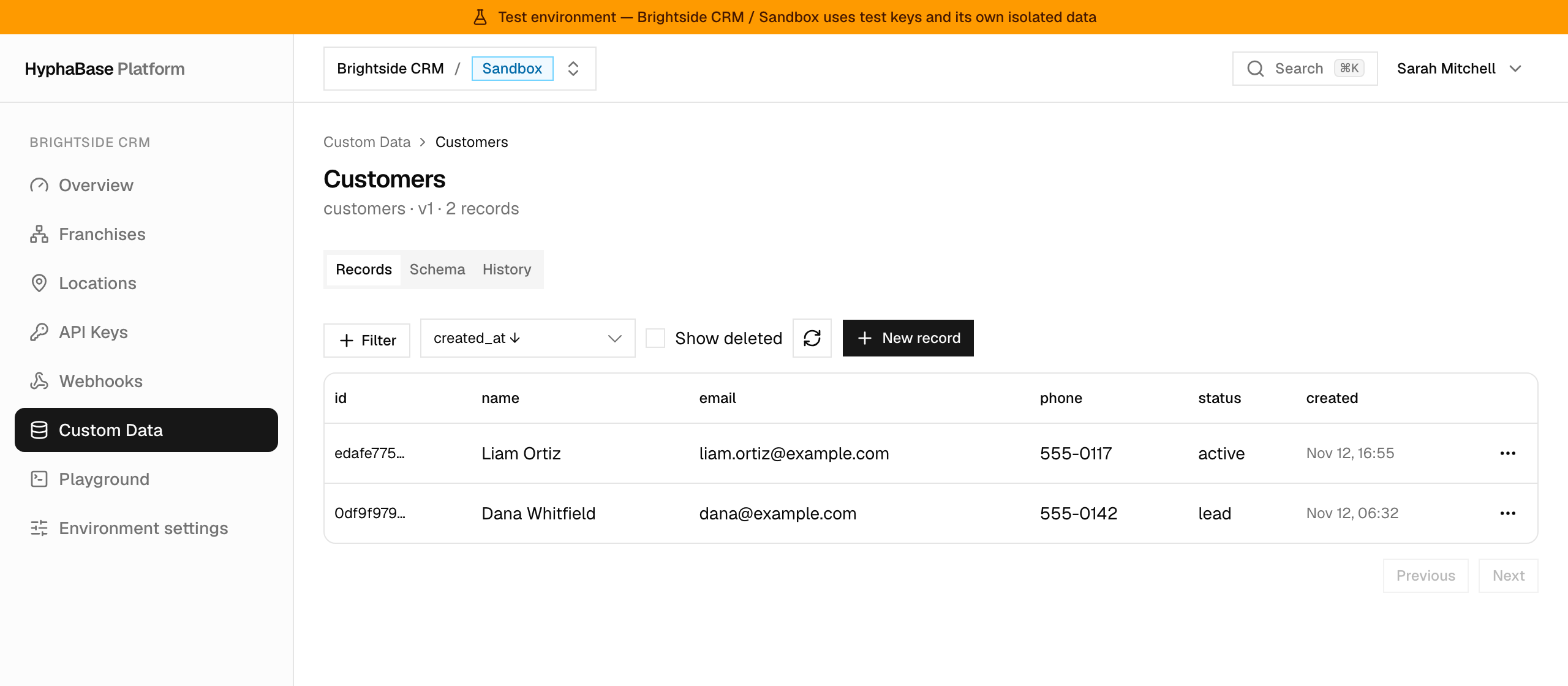
Deleted customer Test Customer <test@example.com>.
It's the same application and the same record. The only thing that changed is who asked. The server's log tells the story in four lines:
marcus@brightsideclean.example was refused: no data.records.delete
DELETE /customers/:id 403
sarah@brightsideclean.example deleted customer c58927f2-cb69-4204-b660-f2ed4f48d35e
DELETE /customers/:id 204
And the test customer is gone from HyphaBase.
Can Marcus promote himself?
This is the question we'd ask about any permission system, so we tested it. The repository's smoke test runs the server against a real environment and checks each of these:
- a signed-in user with no role is refused with
403 - a staff user gets the customers
- a staff user deleting a customer is refused with
403, and the customer is still there afterwards - a staff user going around our server and asking HyphaBase directly to give themselves the Owner role is refused with
403 - the same user trying to create a new role is refused with
403 - an owner deleting a customer succeeds
- deleting it a second time returns
404
Roles are created and handed out with the secret key. A user's own token can't do either, so Marcus can't make himself an Owner however politely he asks.
RBAC vs. ABAC, briefly
You'll see RBAC compared with attribute-based access control, or ABAC, so here's the short version.
| RBAC | ABAC | |
|---|---|---|
| Decides by | The roles a user has | Attributes of the user, the record and the request |
| Example rule | Staff can read customers | Staff can read customers assigned to them, during their shift |
| Easy to explain | Yes | Less so |
| Handles "only their own records" | Not by itself | Yes |
Most business apps start with roles and add a few attribute rules where roles run out, like "only the customers assigned to you". Starting with roles doesn't lock you out of that later.
What this doesn't cover yet
There are good reasons to keep the first version small, but you should know where the edges are.
Everyone in this episode works at one location, Portland. A role here covers all the customers, and we haven't tested rules that differ per location or per record. When Brightside opens Salem, that's a new question, and we'd rather answer it with a test than a promise.
Our server makes two requests to HyphaBase for every request it gets: who is this, then what may they do. That's fine for a staff tool. A busier app would cache the answer for a short time.
There's no command in the repository to take a role away or change its permissions. Both exist in the API. The console doesn't list an app's roles yet either, so the commands above are how you see them.
And deleting is the only change a person can make through our server so far. Adding customers from the CRM comes with the frontend.
The docs go further in who can do what, including how a key's scopes and a user's permissions fit together.
Frequently asked questions
What is role-based access control (RBAC)?
It's a way of deciding what each user may do by giving them roles. A role is a named list of permissions. The server checks the permissions of the user's roles before it carries out a request.
What is the difference between a role and a permission?
A permission is one allowed action, like reading customer records. A role is a group of permissions with a name, like Staff. Users get roles, and roles carry permissions.
Where should permissions be checked, the frontend or the backend?
The backend, always. The frontend can hide what a person may not do, and that's a courtesy to the user. Anyone can send a request without your screen, so the check that counts is on the server.
What status code should a permission failure return?
403 Forbidden. The caller is signed in, and the answer is no. A missing or invalid token is 401.
Does a role change apply right away?
In this CRM, yes. The server asks HyphaBase on every request, so there's no copy of the permissions stored in the token to go stale. If you cache the answer, a change takes as long as your cache does.
How many roles should a SaaS app start with?
As few as you can explain. Two or three that match real jobs is a good start. Add a role when someone has a job the existing ones don't describe.
What is the difference between RBAC and ABAC?
RBAC decides by the user's roles. ABAC decides by attributes, such as who owns the record or which location it belongs to. Many apps use roles for most rules and attributes for the few that roles can't express.
Next in the series
Things are coming along nicely. The CRM stores customers, knows who's signed in, and knows what each person may do. It's also still a set of terminal commands, which is a hard sell for Sarah. In the next episode we add a real frontend with the HyphaBase SDK and Next.js, and keep the secret key on the server while we do it.
Missed an episode? Start with database per tenant vs. shared database, then a CRUD API without the boilerplate.