Building a CRM with HyphaBase · Episode 7
How to Add Search, Filtering and Pagination to a Next.js App Using TypeScript
Add server-side search, a status filter and cursor pagination to a Next.js list with TypeScript, and keep the search in the URL so a reload shows the same rows.
At the end of the last episode our CRM could create, read, update and delete customers, and it knew who was allowed to do each.
It had three customers.
Three customers is a very easy list to search. You look at it.
Brightside Cleaning has a few hundred regulars, though, and our customer list had a quiet little problem. It asked for "the newest 100" and showed whatever came back. Customer number 101 wasn't on the screen at all. Nothing said so.
So we did what anyone would do. We added sixty customers and went looking for Dana.
In this article we add search, a status filter and paging to the customer list. The code is in the series repository.
Why not just filter in the browser?
It's the first thing you think of, and honestly it's about four lines:
const everyone = await api.customers();
const found = everyone.filter((c) => c.name.toLowerCase().includes(typed.toLowerCase()));
It works on the day you write it. It's instant, too.
Then the list grows. Every visit downloads every customer, whether the person wanted one of them or all of them. And every person who can open the page now holds a full copy of your customer table in their browser's memory. Marcus only wanted Dana's phone number. He got the whole business.
There's also the limit we already had. Our list could only ever fetch 100 records in one request, so "filter everything in the browser" was really "filter the newest 100 and hope".
So we turn it around. The browser doesn't get the list and search it. The browser asks a question, and gets the answer:
Customers whose name contains "dan", who are active, 25 at a time.
The database is very good at that question. It's sort of the whole reason it exists.
First, some customers
You can't page through three rows, so the repository has a new command that adds sixty:
$ npm run customer:seed
Added 60 sample customers.
Every one of them is made up. The emails end in example.com and the phone numbers are in the 555-01xx range that's kept for fiction. Please don't put real people in a demo.
It looks customers up by email before it adds anything, so running it twice is safe:
$ npm run customer:seed
Added 0 sample customers. 60 were already there.
All sixty go to HyphaBase in one request. A batch is all or none, so if one record is refused, none of them are created and you don't end up with 37 customers and a mystery.
Searching on the server
The architecture hasn't changed since episode 5. The pages run in the browser and hold no key and no token. They call our own Route Handlers, and those hold the secret key and talk to HyphaBase.
A search is a GET to our own server:
GET /api/customers?q=dan&status=activeThe Route Handler reads three things from the address and nothing else:
export async function GET(request: Request) {
  // ?q=dana&status=active&cursor=... Anything else in the address is not read.
  const asked = new URL(request.url).searchParams;
  const query = { q: asked.get("q"), status: asked.get("status"), cursor: asked.get("cursor") };
  return respond(request, (crm, session) => crm.listCustomers(session, query));
}
The work is in listCustomers. Here it is without its error handling:
await requirePermission(session, CAN.readCustomers);                  // 401 or 403

const parsed = parseListQuery(input);                                 // q, status, cursor. Nothing else.
if (!parsed.ok) throw noSuchPage();                                   // 422
const { q, status, cursor } = parsed.query;

const filter = { ...(q ? { name: { contains: q } } : {}), ...(status ? { status } : {}) };
const page = await customers.list({ filter, sort: "-created_at", limit: PAGE_SIZE, cursor });

return { data: page.data.map(toCustomer), next_cursor: page.meta.next_cursor };
The role is checked first, same as every other route. Nothing about the roles changed this episode. Reading the list needed data.records.read before and it needs it now, for Sarah and for Marcus.
With the SDK, the search itself is one call. contains matches anywhere in the name and doesn't care about capitals. Two filters together mean both have to be true.
On screen, Sarah starts typing and the list narrows as she goes:
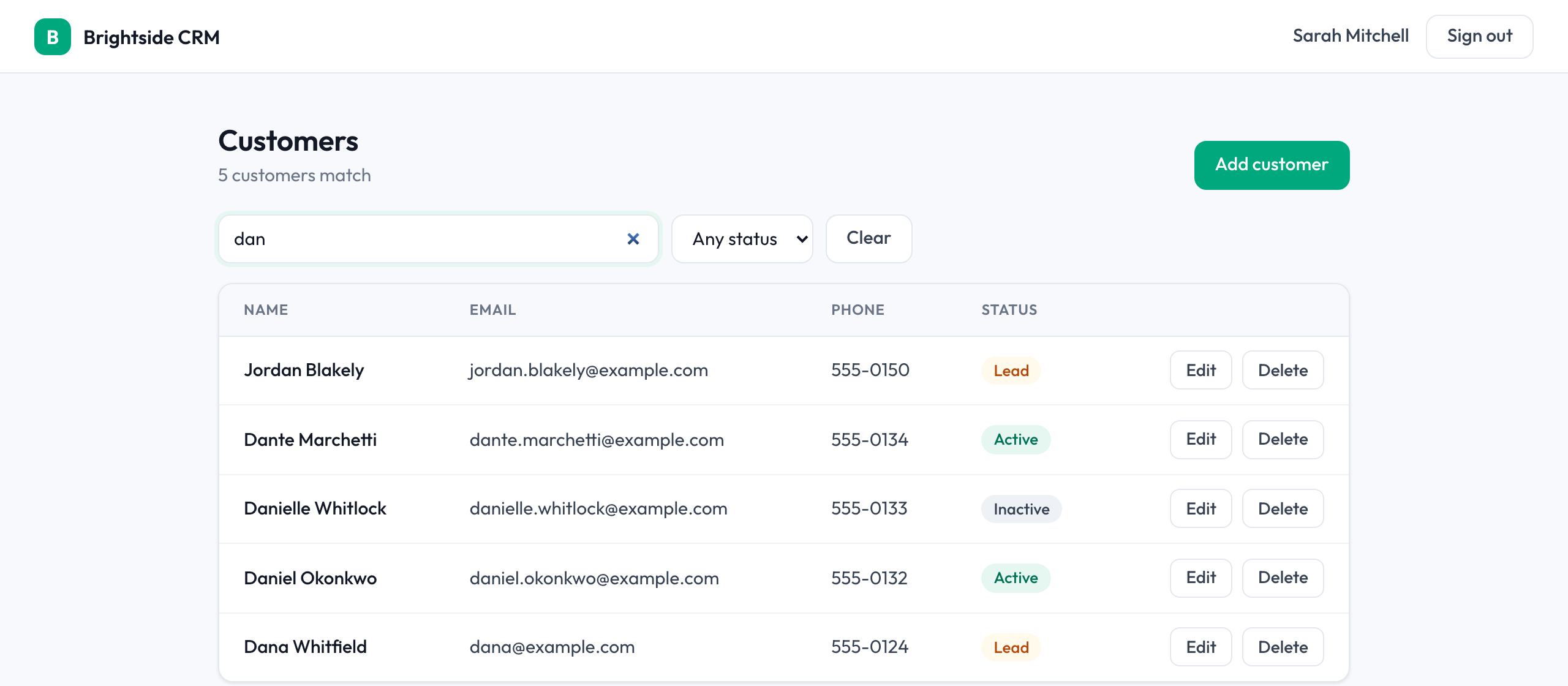
There's Dana. Also Jordan, which is what "contains" means.
Add a status, and both apply:
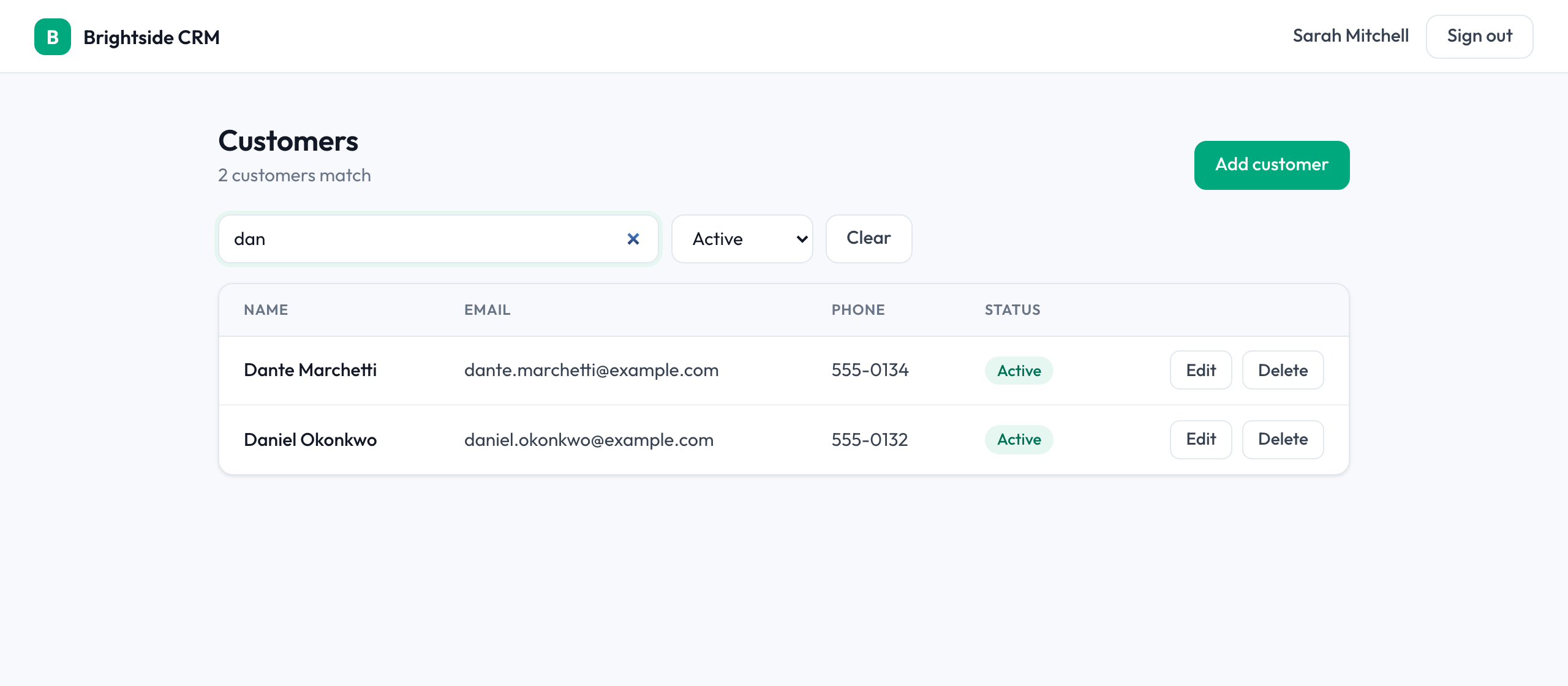
The browser gets two values and a cursor
Look at that server code again and ask what the browser actually controls.
It's two values and a cursor. That's it.
The field we search (name), how we compare it (contains), the order, and the page size are all written on the server. The browser doesn't get a say.
That matters more than it looks. It would have been less code to pass the query string straight through to HyphaBase and let the page build any filter it liked. Then anyone could ask for ?limit=5000, or filter on a field we never meant to make searchable, using our secret key.
We tried both. A request for ?limit=5000 gets 25 customers. A request with filter[email][contains]=@ tacked on gets exactly the same list as one without it, because our server never reads it.
The parsing is small and boring, which is how you want it:
const q = text(raw.q).slice(0, 100);
const status = STATUSES.includes(raw.status as Status) ? (raw.status as Status) : null;
The search is trimmed and stops at 100 characters. A status that isn't one of our three is left out. And whatever gets typed is always sent as a value. Search for % and you find customers with a percent sign in their name, which is to say nobody.
Pages without page numbers
Here's the part that surprised us a little.
HyphaBase doesn't do "page 3". Each answer comes with a next_cursor, and you send it back to get the customers that come after:
const first = await customers.list({ sort: "-created_at", limit: 25 });
const second = await customers.list({ sort: "-created_at", limit: 25, cursor: first.meta.next_cursor });
Think of the cursor as a bookmark. It remembers the last customer you were given, and the next page starts right after that one.
Why not page numbers? Because "page 2" really means "skip 25 rows". Now imagine Marcus adds a customer while Sarah is reading page 1. Every row moves down by one. Sarah clicks to page 2, and the first customer on it is the last one she just read. Delete a customer instead, and she skips one without ever knowing.
A bookmark doesn't count rows, so nothing shows up twice and nothing gets skipped.
On the last page next_cursor is null. That's how the screen knows to take the button away.
So our list opens with 25 customers, and says so:
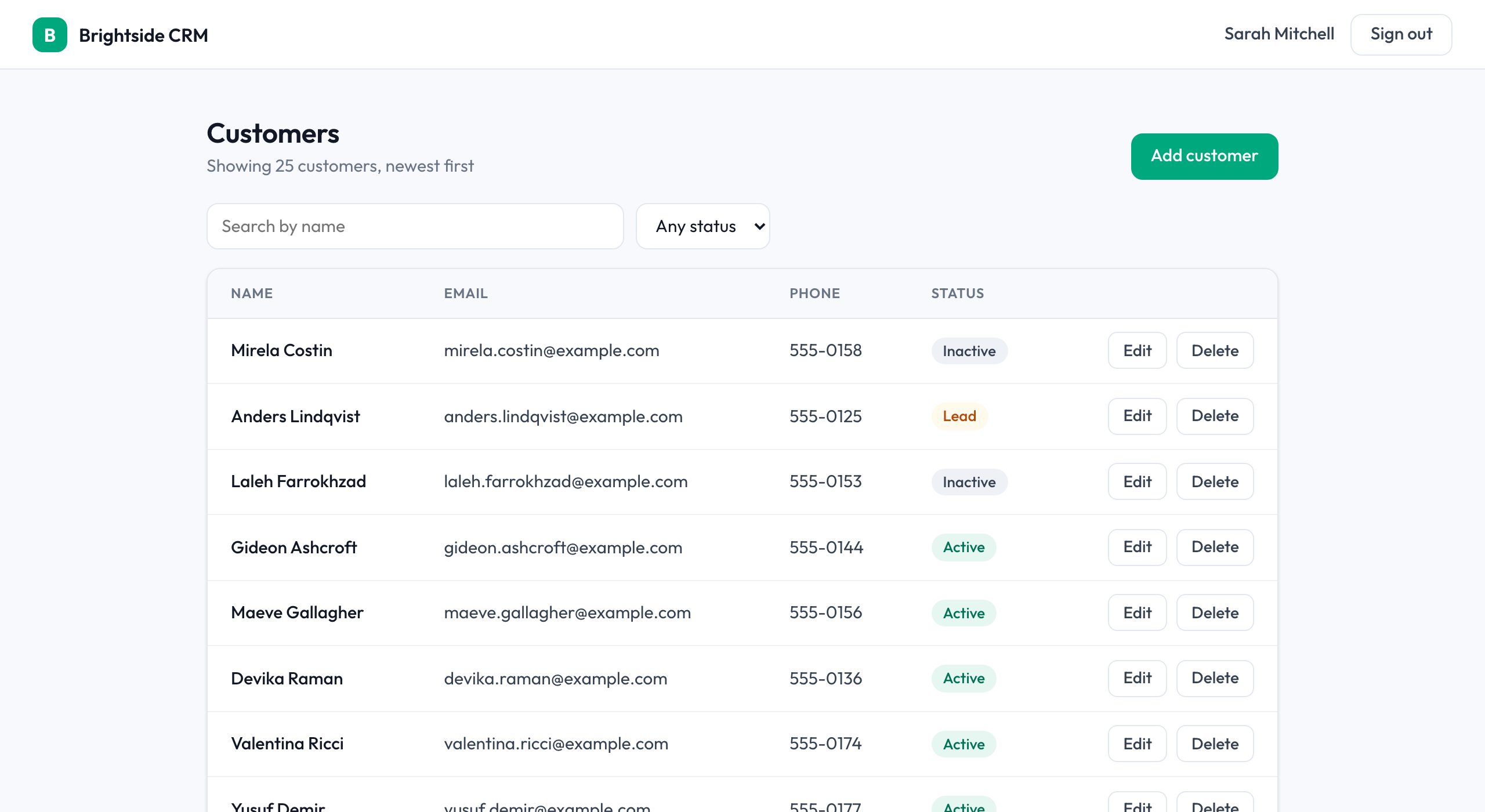
And at the bottom, Load more adds the next 25 underneath:
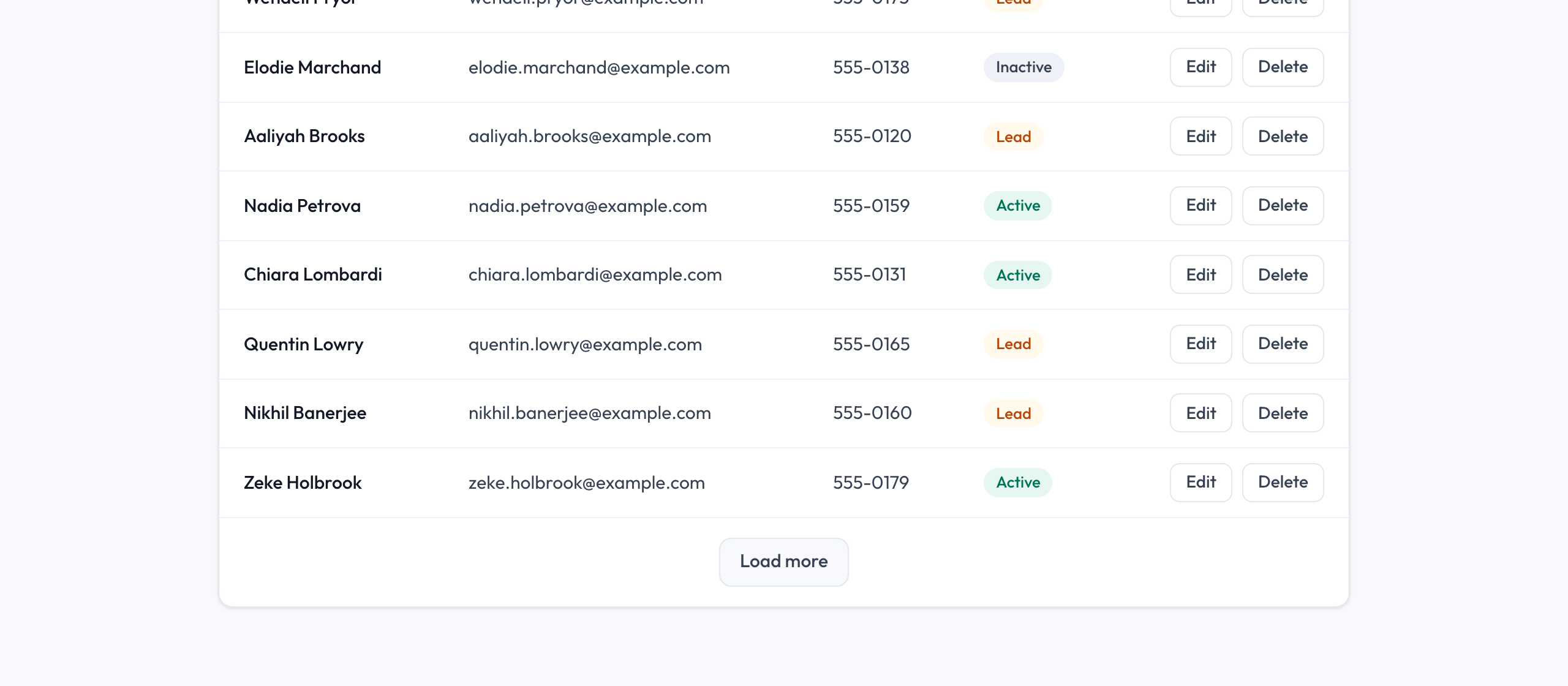
There's a trade, and we'd rather tell you about it than hide it. You don't get a total. HyphaBase tells us there's another page. It doesn't tell us how many customers there are. So the screen says "Showing 25 customers" until the last page is in, and it never says "page 1 of 40". Only when the button is gone does it give you a number.
One more thing. A cursor is only good if HyphaBase handed it out. If the browser sends something else, our server refuses it:
{ "error": "That page is not available any more. Start the list again." }That's a 422. We could have quietly answered with page one instead. But the screen asked for "what comes next", and page one on the end of page one is the same 25 customers twice.
Keeping the search in the URL
When Sarah searches for "dan" and picks Active, the address bar ends in ?q=dan&status=active.
That's on purpose. She can reload the page and get the same two customers. She can bookmark it. She can send it to Marcus, and once he's signed in he sees the same list, minus the buttons his role doesn't have.
We write it with history.replaceState, so the Back button isn't filled with one entry for every letter she typed.
The cursor doesn't go in the address. A link with a cursor in it would open in the middle of the list, with no way to see what came before it.
Typing without flooding the server
Search-as-you-type has two small traps.
The first is sending a request for every key. Ours waits a quarter of a second after the last one. Typing "dan" at a normal speed is one request, not three.
The second is sneakier. Answers don't always come back in the order you asked. The answer for "da" can be slow and land after the answer for "dan", and now the screen shows results for something that isn't in the box any more.
So each request gets a number, and an answer is only used if it belongs to the newest one:
const request = ++asked.current;
// ...
const page = await api.customers(filter);
if (request !== asked.current) return;   // an older question. Its answer is thrown away.
Three lines. It's the kind of bug you only see on a slow connection, in front of a customer.
What about Marcus?
Marcus can search too. Finding a customer is reading, and his role can read.
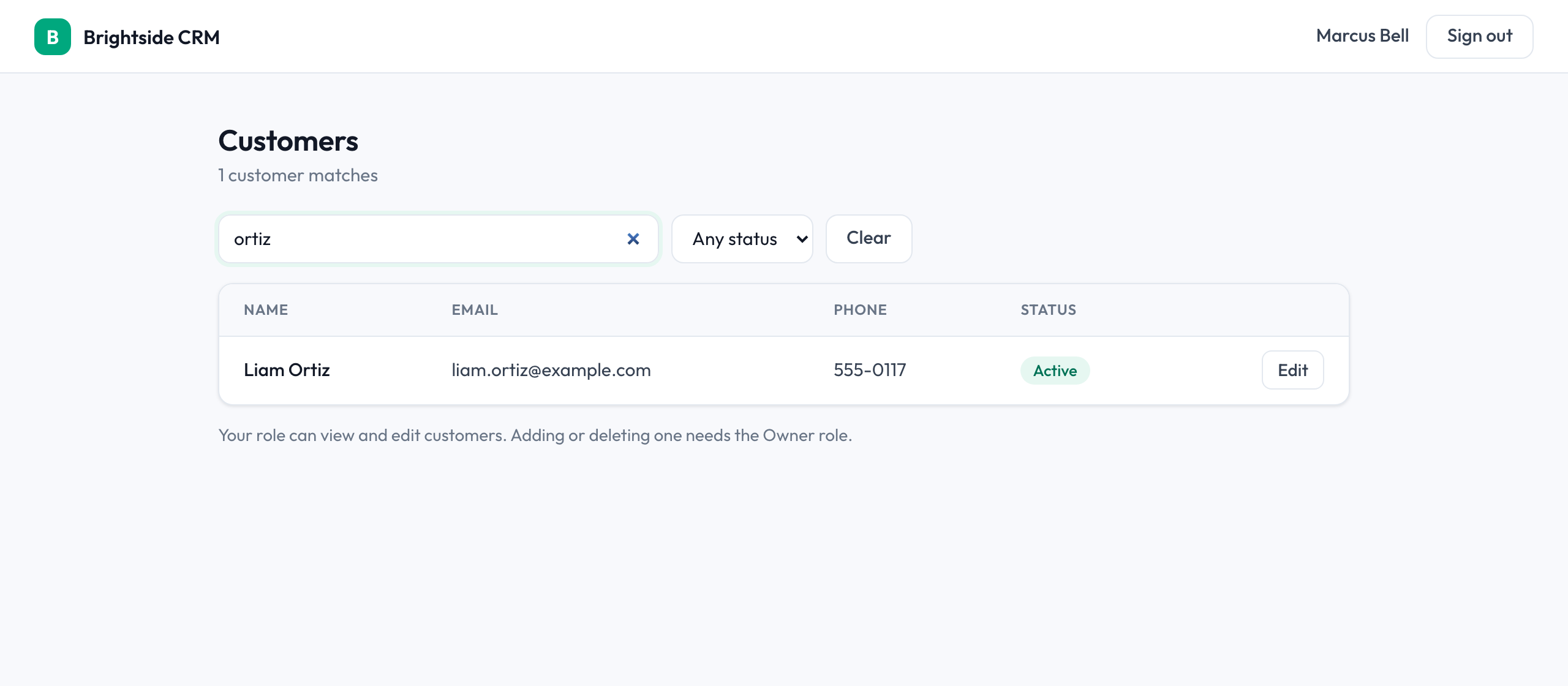
We didn't add a "search" permission, and we'd suggest you don't either. There's one check, data.records.read. If someone may see the customers, they may look through them.
And signed out? Same request, straight from the browser's console:
await fetch("/api/customers?q=dan").then((r) => r.json()){ "error": "Sign in first." }That's a 401, and the search never ran.
Does it hold up?
Same deal as always. We'd rather test this than promise it. The smoke test builds the app, starts it and talks to it the way a browser would, against a real environment. It adds 27 customers of its own so it knows what the right answers are. New this episode, it checks each of these:
- seeding twice adds 27 customers, then 0
- the first page has 25 and a cursor, the second has the other 2 and no cursor, and no customer is on both
- a search typed in capitals finds names in lower case
- search and status together find the 9 that are active
- a status that doesn't exist is ignored
%and_in a search are treated as text and match nothing- a
limitor afilteradded to the address changes nothing - a made-up cursor gets a
422 - with no cookie at all, a search gets a
401
Then it removes its 27 customers and leaves.
What this doesn't cover yet
Search looks at names only. Type part of an email and you get this:
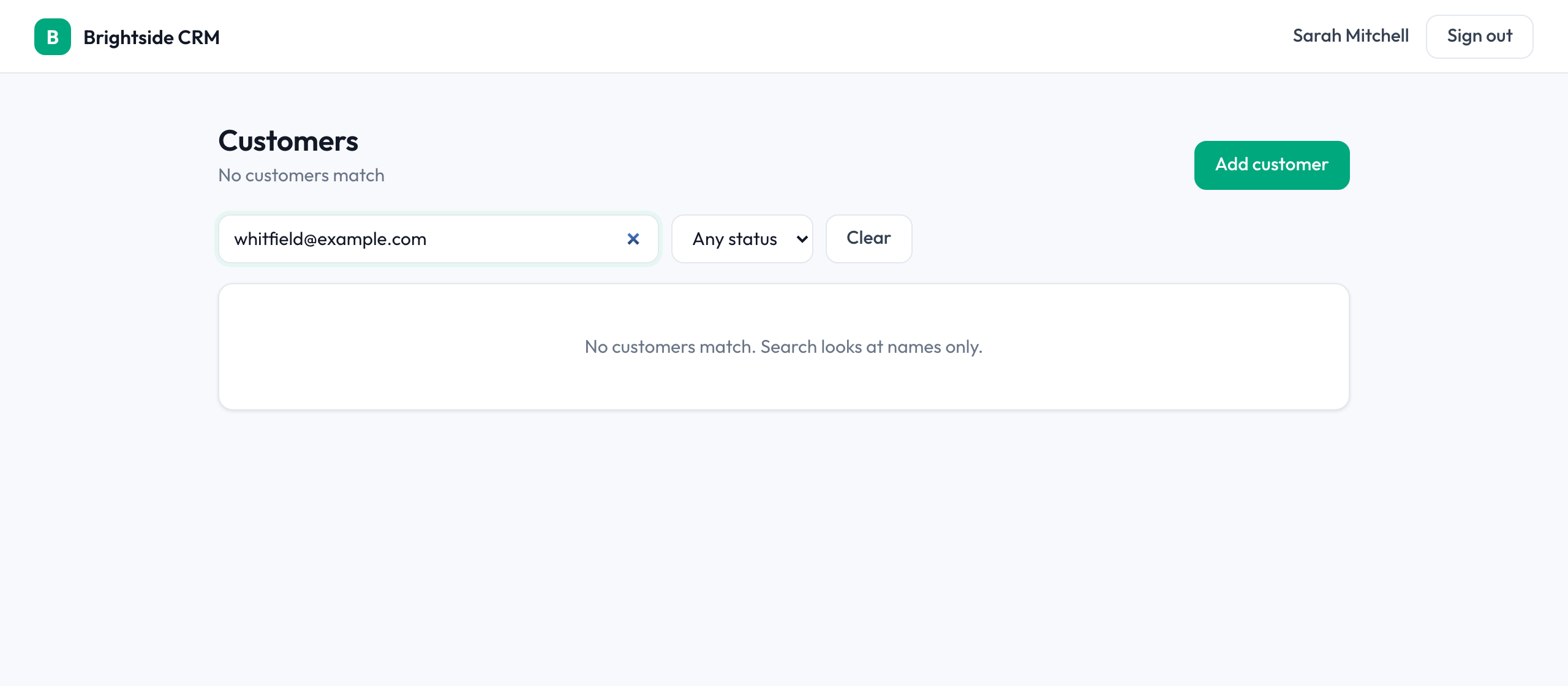
That's a limit in HyphaBase today, not a choice we made for fun. Record filters combine with and, so "name or email contains" isn't one request. We could have sent two requests and merged them in our own code, but two lists stitched together can't be paged honestly, so the CRM says what it does instead of pretending.
There's no total count, so no "312 customers" at the top until you've loaded them all.
Paging only goes forward. There's no cursor for the page before. The screen keeps what it has already loaded, which is why we went with Load more and not Next and Previous.
The order is fixed at newest first. The column headings don't sort.
If you edit a customer so they no longer match the search, they stay on screen until you search again.
And if you want to run this yourself, the HyphaBase sandbox is free but open by invitation for now. You can join the early-access list at hyphabase.com and we'll send you a code.
Frequently asked questions
Should I filter a list in the browser or on the server?
On the server, once the list can grow. Filtering in the browser means downloading every record first, on every visit, to every person who can open the page. Ask the database for the rows you want and send only those.
What is cursor pagination?
Each page of results comes with a cursor, a marker for where that page ended. To get the next page you send the cursor back. There are no page numbers, and the next page always starts after the last record you were given.
Why use cursor pagination and not page numbers?
Page numbers skip a fixed count of rows. If a record is added or removed while someone is reading, every row shifts, and they see one twice or miss one. A cursor points at a record, not a position, so the list stays consistent.
How do I keep search filters in the URL in Next.js?
Write them to the query string when they change, and read them back when the page loads. We use history.replaceState so each keystroke doesn't add an entry to the browser history. The result is a list that survives a reload and can be shared as a link.
How do I stop a search box sending a request on every keystroke?
Debounce it. Wait a short moment after the last key, about a quarter of a second, before sending. Also ignore any answer that isn't for the most recent request, because answers can arrive out of order.
Is it safe to pass the browser's query string straight to my database or backend?
No. Read only the parameters you expect, check each one, and build the query on the server. Otherwise a visitor chooses the fields, the operators and the page size, using your server's credentials.
Why doesn't the list show a total number of customers?
Counting every match costs a second query, and the API we're building on returns a page and whether there's another one, not a count. We show how many are on screen and give a total only once the last page has loaded.
How many records should one page return?
Enough to fill the screen and not much more. We use 25, and the server decides it. The browser can't ask for more.
Next in the series
The CRM can now find a customer in a long list, by name and by status, without handing the whole list to the browser.
But every customer we've added so far belongs to one location, Portland. Brightside has a second one in Salem, and it's been sitting there empty since episode 1.
Next, Salem gets customers, and we find out what keeps one location's staff out of another location's records.
New here? The series starts with database per tenant vs. shared database.