Building a CRM with HyphaBase · Episode 1
Database per Tenant vs. Shared Database: What Should You Use for SaaS?
Shared tables, a schema per tenant, or a database per tenant? How the three multi-tenant database models compare on isolation, cost and operations.
Starting a new SaaS application sounds simple enough. Then comes the part nobody puts in the exciting product mockups: database provisioning, authentication, permissions, and figuring out where each customer's data should live.
That last one is what this article is about. Most SaaS applications serve more than one organization, and those organizations shouldn't be able to see each other's records. There are three common ways to set that up, and there isn't one that makes sense for every product.
We'll go through all three, say when we'd pick each, and then show the one we picked for HyphaBase in the first episode of our CRM build-along.
What is multi-tenancy?
A tenant is one customer of your software. It could be a company, a franchise, a clinic or a single store. A multi-tenant application serves many tenants from one codebase and one deployment. They share the application, but they must never see each other's data.
Keeping them apart is called tenant isolation. The database design decides how much of that isolation you get for free, and how much depends on every query being written correctly.
The three multi-tenant database models
1. Shared database, shared tables
All tenants use the same tables. Every row carries a tenant_id column, and every query filters on it.
SELECT * FROM customers WHERE tenant_id = 42 AND status = 'active';This is the cheapest way to start and the easiest to run. You have one database to migrate, one to back up and one connection pool. A report across all tenants is ordinary SQL.
The catch is that the isolation lives in your code. If a query forgets the filter, it returns another company's data, and the database won't complain. PostgreSQL's row-level security helps a lot here, because it moves the filter into the database. You still have to write the policies, test them, and remember them on every new table.
There are two smaller problems. One busy tenant can slow down the tables everyone shares. And if a single tenant asks for a restore or an export, you're picking their rows out of every table.
2. Shared database, a schema per tenant
Tenants share one database, and each gets its own schema with its own copy of the tables.
The boundary is clearer than a column. A query runs inside one schema and won't return rows from another unless it names it. Exporting one tenant gets easier too.
What you pay for it is operations. A migration now runs once per schema. If you have a thousand tenants, a release is a thousand migrations, and a few of them will fail halfway. The tenants also still share one server's memory, disk and connection limits.
3. A database per tenant
Each tenant gets its own database. The application picks the right connection on each request.
This is the strongest separation of the three. A buggy query can only return rows from the database it's connected to. Backing up, restoring, exporting, moving or deleting one tenant is something you do to one database. If a tenant has heavy load or special requirements, you can put them on their own hardware.
The hard part is everything around the database. Something has to create it when a tenant signs up. Every migration has to run against every database. You need to know which ones are ready, manage connections across all of them, and back each one up. That's a lot of engineering, and it's why most teams don't start here.
Shared database vs. database per tenant: a comparison
| Shared tables | Schema per tenant | Database per tenant | |
|---|---|---|---|
| Isolation enforced by | Query filters or row-level security | Schema boundary | Separate database |
| A missing tenant filter | Can expose another tenant's rows | Stays inside one schema | Stays inside one database |
| Migrations | Run once | Run once per schema | Run once per database |
| One tenant's load | Affects shared tables | Affects the shared server | Can be isolated |
| Restore or export one tenant | Row-by-row extraction | Per schema | Per database |
| Reports across tenants | Simple | Harder | Hardest, needs aggregation |
| Cost at small scale | Lowest | Low | Highest |
| Work to operate | Lowest | Medium | Highest |
Which model should you choose?
If you're deciding for your own SaaS, these four questions matter more than any slogan about which model is best.
How bad is a leak? A to-do app and a system that holds patient or payment records are very different. If one tenant seeing another's data would lose you the contract, the stronger separation is worth paying for.
How many tenants will you have, and how big are they? Ten thousand free accounts with a few rows each belong in shared tables. A few hundred businesses with years of records each are a reasonable fit for a database each.
Will tenants ask for their data back, moved or deleted? Business buyers do. That's easy with a database per tenant and tedious with shared tables.
Who's going to run it? A database per tenant only works if you have the tooling for provisioning, migrations, health checks and connections. Without it, you've built something that looks safe on a whiteboard and pages you at night.
Plenty of teams start with shared tables and move their large or regulated customers to their own database later. That works. Just know that the move is a migration project, and it's easier if you planned for it at the start.
What isolation doesn't do
We want to be careful here, because this is where the marketing usually gets ahead of the engineering. A separate database doesn't make leaks impossible. If your API hands out the wrong tenant's connection, the database model won't save you. The same goes for a user who can open a record they shouldn't see inside their own tenant.
Isolation limits how far a mistake can spread. You still need authentication, authorization and tests that try to cross the boundary. We get to those later in the series, starting with authentication and authorization.
How HyphaBase does it: a database for every location
HyphaBase is a backend for developers building multi-location business software. For that kind of app, the boundary that matters is the location: one branch, one store, one clinic. So we went with a database per location, and we built the tooling around it so you don't have to.
In episode 1 of the build-along, we set up the backend for Brightside CRM, a customer list for a home cleaning company. There's no code in this episode. It all happens in the console:
- Create an app. We called ours Brightside CRM. It starts with a sandbox environment.
- Add a location. Ours is Portland.
- Wait a moment while HyphaBase provisions the location's database.
- Create a secret API key with the scopes the next episode needs.
When the Overview page shows the location as ready, that's it. Portland has a database and an API in front of it, and we didn't install or configure anything.
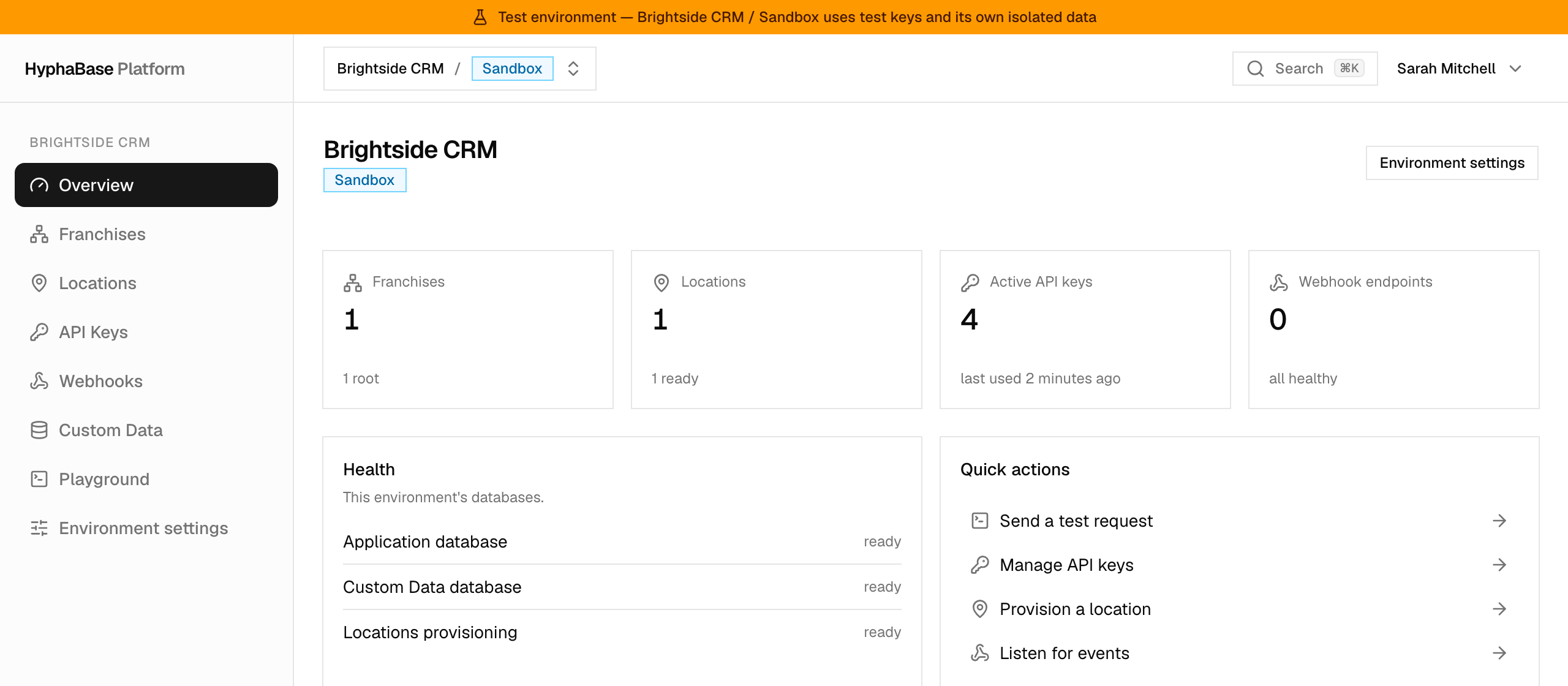
Here's what that gets the CRM.
Portland's records aren't in the same place as Salem's. When Brightside opens a second location, it gets its own database, and a query for one can't return rows from the other.
Every request says which location it's about. It carries an X-Location-Id header, and an API key only reaches the locations it's been granted.
You can see provisioning happen. A new location exists right away but takes a moment to become usable. Until then the API answers 503, so your code can wait and retry.
Some things are meant to be shared. Data that should be the same everywhere is defined once for the app, and each location opts in.
The trade-offs in the table above still apply to us. Reports across locations need aggregation, and running many databases is more work than running one. The difference is that it's our work. Provisioning, migrations and health checks are part of the platform. The locations guide in the docs has the details, including the errors you'll run into while wiring it up.
Frequently asked questions
What is the difference between single-tenant and multi-tenant?
A single-tenant application runs a separate copy of the software for each customer. A multi-tenant application serves all customers from one deployment. A database per tenant is still multi-tenant, because the application is shared and only the storage is separate.
Is a database per tenant more secure than a shared database?
It gives you stronger separation, because a query can't reach rows in a database it isn't connected to. It doesn't replace access control. Either way you need authentication, authorization and tests that try to cross the boundary.
Does a database per tenant scale?
It does for hundreds or thousands of tenants that each hold a meaningful amount of data, as long as provisioning, migrations and connections are automated. It's a poor fit for huge numbers of tiny tenants. Shared tables cost far less there.
Can I use PostgreSQL row-level security instead?
Yes. Row-level security is a good way to enforce the tenant filter inside a shared database. You still write and maintain a policy for every table, and all tenants still share the same tables, load and backups.
How do migrations work with a database per tenant?
Every schema change runs against every tenant database. You need a runner that knows which databases have which migrations and can pick up again after a failure. On HyphaBase that runner is part of the platform.
What should a new SaaS start with?
If your tenants are small and a leak would be embarrassing but survivable, shared tables with row-level security is a sensible start. If you sell to businesses that expect their data to be kept apart, exported or deleted on request, plan for a database per tenant from the beginning, or use a platform that gives you one.
Next in the series
So the backend is ready. There's just one small problem: it doesn't hold anything yet. In episode 2 we define a Customers collection and create the first record through a CRUD API, without writing a controller or a migration.