Building a CRM with HyphaBase · Episode 5
How to Connect a Next.js Frontend to a Backend API Using TypeScript
Connect a Next.js frontend to a backend API with TypeScript. The secret key stays on the server, the session lives in a cookie, and every request is checked.
We've spent the last few episodes building the backend for our example CRM.
We provisioned a database, created a Customers collection, added sign-in, and set up roles and permissions.
Everything sounds pretty good.
There's just one small problem.
We don't actually have a CRM interface yet. Our customers exist, but nobody can see them without running a terminal command, and a cleaning company's office is not going to run npm run crm:customers.
Let's fix that. In this article we connect a Next.js frontend to a backend API with TypeScript, and we do it without handing the browser anything it shouldn't have. The code is in the series repository.
The first question a frontend raises
Where does the secret key go?
Until now that was easy. Our code ran in a terminal on our own machine, and the key sat in a .env file next to it. A frontend runs in somebody else's browser. Anything a browser downloads, anyone can read, and our secret key can read and write every customer.
So the browser can't have it. That's true of any backend with a privileged key, whether it's HyphaBase, a payment provider or your own API.
The usual answer is to put a small server between the pages and the backend. You'll see it called a backend for frontend. The pages talk only to that server, and the server is the one that holds the key.
| Runs in | Holds | Talks to | |
|---|---|---|---|
| Pages | The browser | No key and no token | Our own server |
| Server routes | Our server | The secret key | HyphaBase |
Keeping the key on the server is necessary, and it isn't enough. A route that holds a secret key and answers anyone who asks is just a public API with extra steps. The server still has to work out who's asking and what they're allowed to do, which is what episode 3 and episode 4 were for.
Why Next.js?
We wanted a React frontend and a safe place to run the server half. We could have built a React app and a separate Express server, and that would work.
Next.js lets us keep both in one project. The pages are React components, and the server half is a handful of Route Handlers under app/api/. One project to run, one to deploy.
HyphaBase doesn't need Next.js. The server logic in this episode is a plain TypeScript file that knows nothing about the framework, and it would sit behind any other Node server unchanged. We picked Next.js because it keeps the tutorial short.
Install the SDK
The earlier episodes had no dependencies at all. Every request was a hand-written fetch. This time we use the HyphaBase SDK, which is on npm:
npm install hyphabaseHere's the list request from episode 2, written by hand:
const RECORDS = "/api/modules/data/customers/records";

export async function listCustomers(api) {
  const { data } = await api.request(`${RECORDS}?sort=-created_at`);
  return data;
}
That sat on top of a helper of our own that set the headers, parsed the answer and turned failures into errors. With the SDK:
const server = createClient(apiUrl, secretKey, { storage: memoryStorage() });
const customers = server.data.collection<CustomerFields>("customers");

const page = await customers.list({ sort: "-created_at", limit: 100 });
The request that goes out is the same one. What we no longer write is the URL, the headers and the error handling. The result is typed too, so page.data[0].status is "lead" | "active" | "inactive" and the editor complains if we misspell it.
We don't regret writing it by hand first. We know exactly what the SDK sends.
Two clients, two keys
Every HyphaBase API key is a pair. We've been using the secret half, which starts with sk_. There's also a publishable half, which starts with pk_, and this episode is where it earns its place.
Our server makes two kinds of request, and it uses a separate SDK client for each.
The first is the server acting as itself, with the secret key. This is the only client that touches customers:
const server = createClient(apiUrl, secretKey, { storage: memoryStorage() });The second is the server acting as one person, with the publishable key and that person's session:
const actingAs = (session: SessionStorageAdapter) =>
  createClient(apiUrl, publishableKey, { locationId, storage: session });
This client signs people in, asks HyphaBase who a session belongs to, and asks what their roles allow. A publishable key can't read any customer data by itself. So if the session is missing, made up or revoked, this client has nothing to fall back on and the request fails.
Our first version used the secret key here too, and that was slightly concerning. A client that holds a secret key and has no valid session sends its requests as the key. That's right for a server acting as itself. It's wrong when the question is "what may this person do?", because the answer comes back as everything the key can do. The publishable key closes that door.
Keep the session in a cookie the page can't read
When Sarah signs in, the browser sends her email and password to our own /api/login. The server signs her in with the SDK and puts the session in a cookie:
jar.set(SESSION_COOKIE, encodeSession(session), {
  httpOnly: true,
  sameSite: "strict",
  secure: process.env.NODE_ENV === "production",
  path: "/",
});
httpOnly means no script on the page can read the cookie. The page gets back Sarah's id, name and email and nothing else, so there's no token in the page and none in local storage. A script injected into the page has nothing to steal.
sameSite: "strict" means another website can't make Sarah's browser send the cookie. We also check the Origin header a browser sends and refuse a request that names another site. The cookie setting already covers it. We just like having a second lock.
The SDK accepts any object with get, set and clear as its session storage, so the cookie plugs straight in. When the SDK renews a session that's about to run out, it calls set, and the new session lands in the cookie without any code of ours.
Check every request on the server
This is the guard from episode 4, with the SDK doing the asking. We've left out the error handling here:
async function identify(session: SessionStorageAdapter) {
  if (!session.get()) throw refuse(401, { error: "Sign in first." });

  const person = actingAs(session);
  const { user } = await person.profile.get();
  const { permissions } = await person.profile.permissions();
  return { user, permissions };
}

async function requirePermission(session: SessionStorageAdapter, permission: Permission) {
  const { user, permissions } = await identify(session);
  if (permissions.includes(permission)) return user;

  log(`${user.email} was refused: no ${permission}`);
  throw refuse(403, { error: "Your role does not allow this.", required_permission: permission });
}
The cookie also contains a name and an email. The server doesn't trust them. Who the person is comes from HyphaBase on every request, and so does what they may do.
Adding a customer is then three steps, in this order:
const user = await requirePermission(session, CAN.addCustomers);   // 401 or 403

const parsed = parseCustomer(input);                               // 422, one message per field
if (!parsed.ok) throw refuse(422, { error: "Check the highlighted fields.", errors: parsed.errors });

const customer = await customers.create(parsed.customer);          // as the server
parseCustomer passes on four fields (name, email, phone and status) and drops anything else the browser sent. The Route Handler itself is only the connection to HTTP:
export async function POST(request: Request) {
  const body = await bodyOf(request);
  return respond(request, (crm, session) => crm.addCustomer(session, body));
}
The page side
The pages call our own routes with plain fetch. There's no HyphaBase URL, key or token anywhere in them.
Sarah signs in, opens the form and adds a customer.
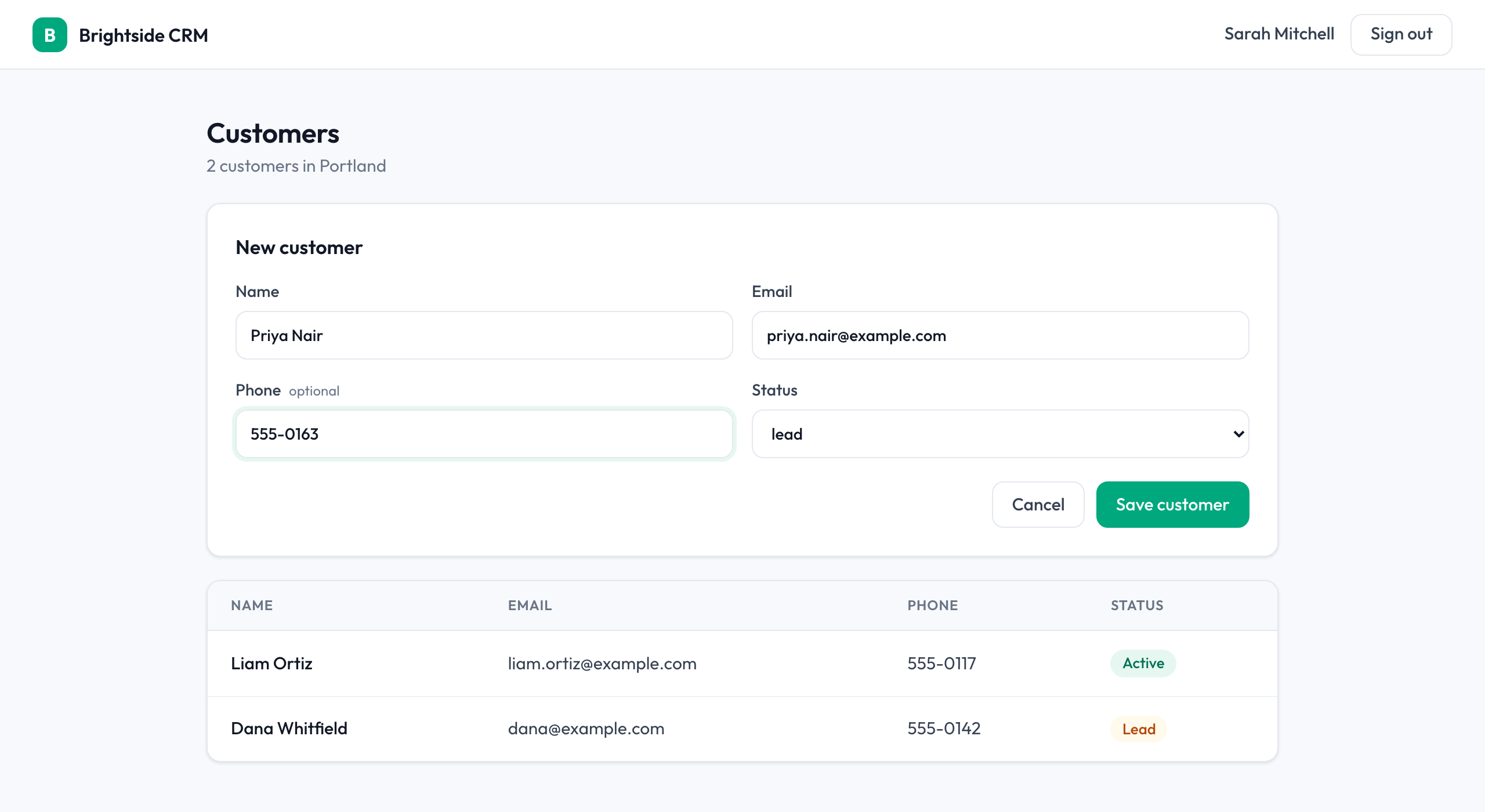
She saves, and Priya is at the top of the list without a page reload. After a successful save the form hands the new customer to the table, which puts it first.
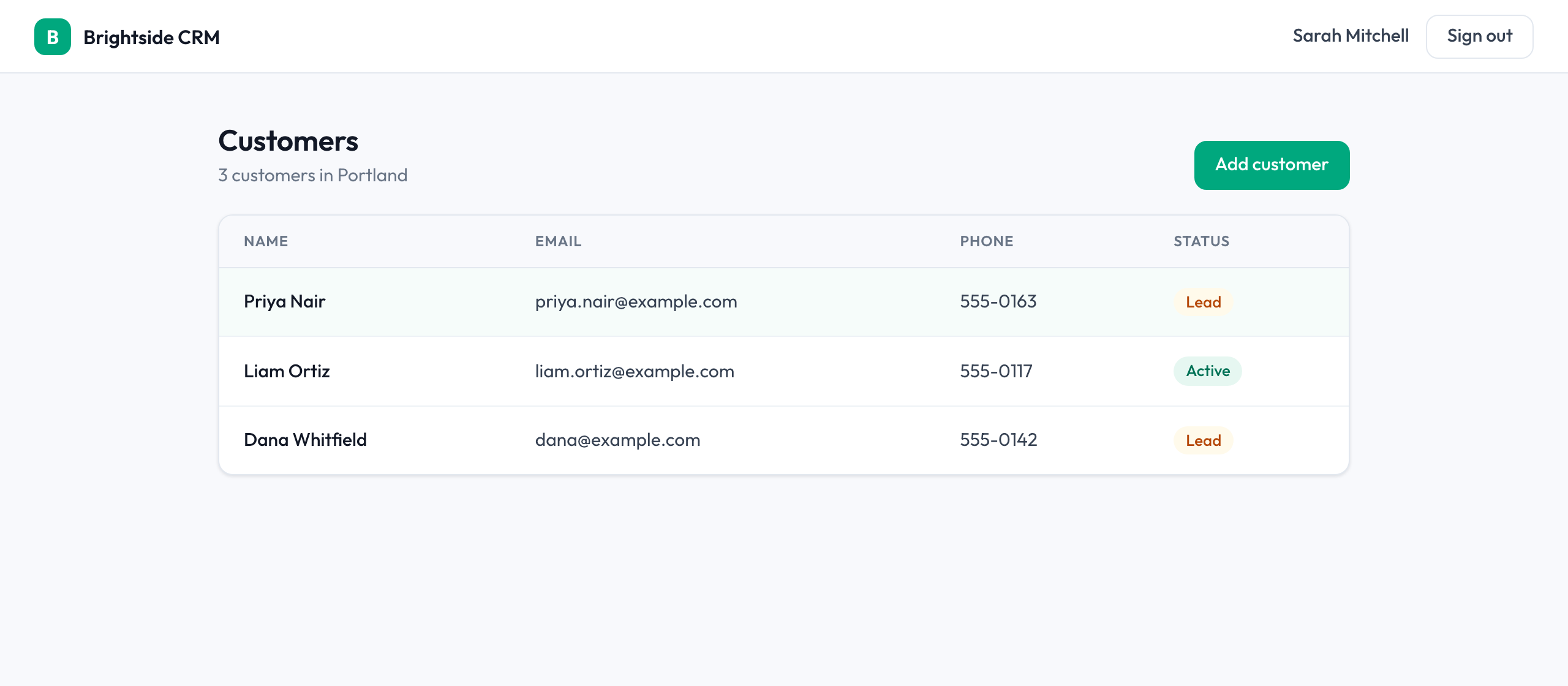
Progress.
Now Marcus signs in. He has the Staff role from episode 4, which can read customers and nothing else.
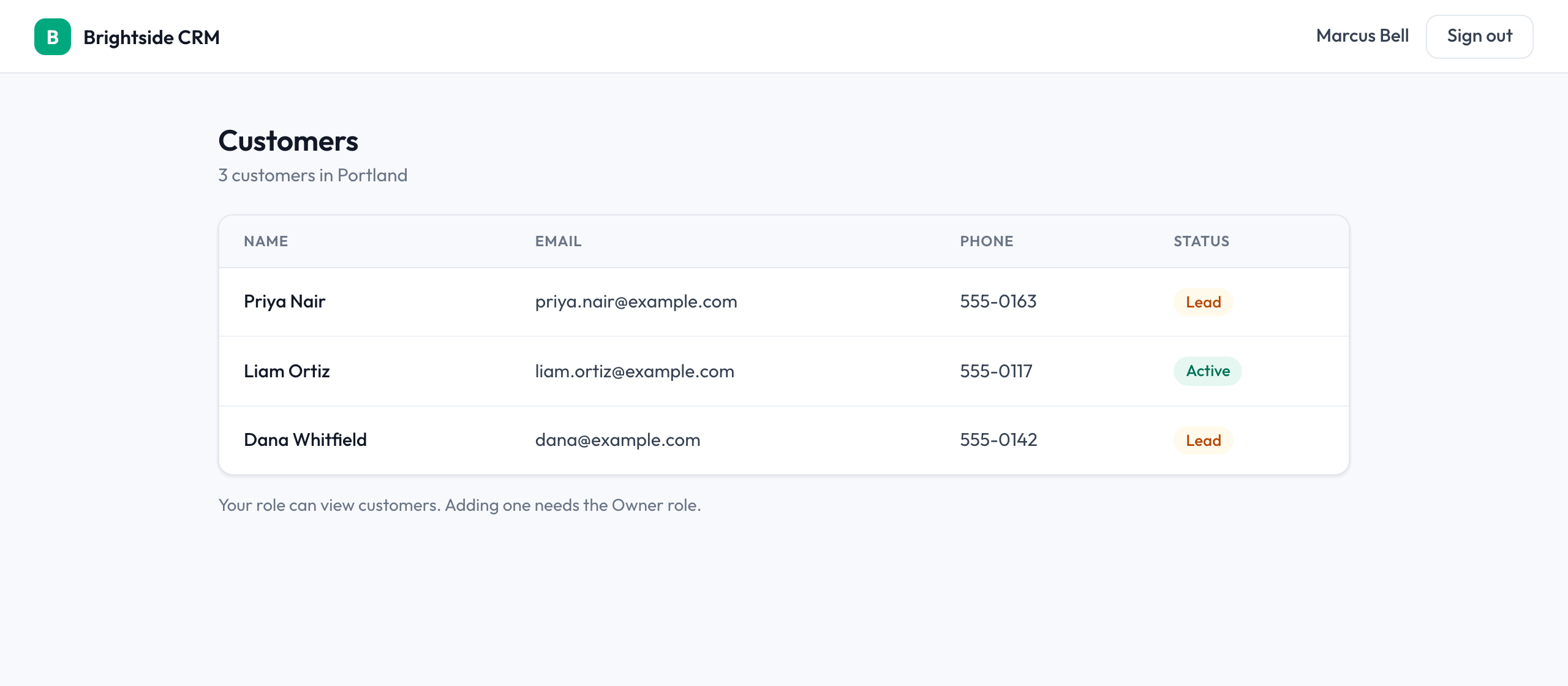
There's no Add customer button for him. The button is shown when a person's permissions include data.records.create, and his don't.
That's a courtesy, as we said last time. Marcus can still send the request by hand. Spoiler: that request shouldn't work, and it doesn't. The server answers 403.
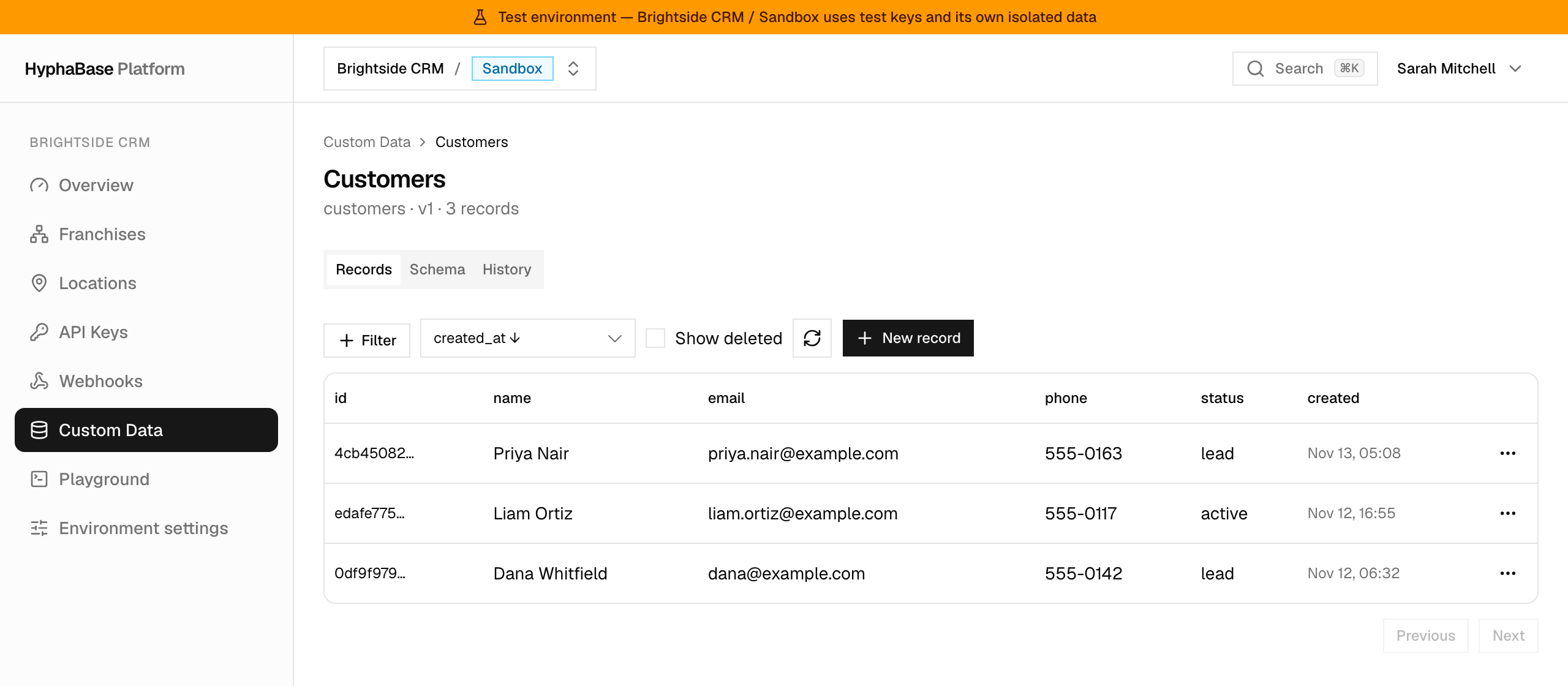
And Priya is a real record in HyphaBase. The page isn't just remembering her. The console shows the same row:
Does it hold up?
We'd rather test this than promise it. The repository has 48 unit tests that run without a network, and a smoke test that builds the app, starts it and talks to it the way a browser would, against a real environment. It checks each of these:
- no cookie gets a
401, and so does a made-up cookie that names a real user - a wrong password gets a
401 - a staff user reads the customers, and adding one is refused with
403 - an owner sending bad input gets a
422with one message per field - an owner adds a customer and gets a
201, and the same email again is refused with409 - a request sent from another website is refused with
403 - after signing out, the old cookie gets a
401, because the session ended at HyphaBase and the browser's copy is worthless - the secret key is in no file the browser can download
On that last one, we don't rely on being careful. The file that reads the secret key imports server-only, so the build fails if a page ever imports it. Next.js also only gives the browser variables named NEXT_PUBLIC_..., and this app has none.
What this doesn't cover yet
Our server makes three requests to HyphaBase for every customer request it gets: who is this, what may they do, and then the data. That's fine for a staff tool. A busier app would cache the first two for a short time.
If the same person has two tabs open at the moment their session is renewed, one tab can be asked to sign in again.
The list shows the newest 100 customers. There's no search or paging yet.
A person can add a customer from the screen but can't edit or delete one. The delete route exists and is tested. It just doesn't have a button.
And if you want to run this yourself, the HyphaBase sandbox is free but open by invitation for now. You can join the early-access list at hyphabase.com and we'll send you a code.
The docs have more on publishable and secret keys and what each one may do.
Frequently asked questions
How do I connect a Next.js frontend to a backend API?
Have your pages call your own Route Handlers, and have those handlers call the backend. The pages stay simple, and anything privileged, like an API key, lives in the handlers where the browser can't see it.
Where should I store a secret API key in Next.js?
In a server-only environment variable, read only by server code. Never give it a NEXT_PUBLIC_ name, because Next.js sends those to the browser. Importing server-only in the file that reads the key makes the build fail if client code ever pulls it in.
Can I call the backend straight from the browser?
Only with a credential that's safe to publish. A publishable key is made for that, and it can do very little without a signed-in user. A secret key never belongs in the browser.
Should I keep the session token in local storage or a cookie?
We'd use an httpOnly cookie. Any script on the page can read local storage, including one that shouldn't be there. A page script can't read an httpOnly cookie at all.
Do I still need to check permissions if the API key is on the server?
Yes. The key proves the request came from your server. It says nothing about the person who caused it. Your server has to identify the user and check their permissions before it uses the key for them.
What is a backend for frontend?
It's a small server that exists for one frontend. It holds the credentials, checks who's asking, and passes on only what that frontend needs. Next.js Route Handlers are a common way to build one.
Do I need Next.js to use HyphaBase?
No. The SDK is plain TypeScript and works on any Node server, and the REST API works from any language. Next.js is just our example.
Next in the series
The CRM finally has screens. Sarah can sign in, see her customers and add one, and Marcus can look without touching.
Nobody can fix a typo yet, though, and deleting a customer still means opening a terminal. Next we add editing and deleting from the screen.
New here? The series starts with database per tenant vs. shared database. The customers in this episode come from a CRUD API without the boilerplate, and the rules Marcus keeps running into are from role-based access control in SaaS.