Building a CRM with HyphaBase · Episode 2
How to Create a CRUD API Without Writing All the Boilerplate
Define a Customers collection in a few lines of JavaScript and get a validated REST API for creating and reading records. No controllers, no migrations.
Let's say you're building a customer management app. Nothing particularly exotic: a name, an email, a phone number and a status field.
You'd think the interesting part would be the customer experience. Instead, the first stretch of work is a list of things that have to exist before you can save even one record.
In this article we go through that list, then build the API for our CRM in a few lines of JavaScript, using plain fetch against HyphaBase. All the code here is from the series repository, and it runs.
What a CRUD API needs before the first record
CRUD stands for create, read, update and delete. If you write it by hand, even a four-field resource needs most of this:
- a table, and a migration that creates it
- a model or query layer
- routes and a controller for each operation
- input validation, with errors a client can show next to the right field
- constraints like required fields, unique values, allowed values and defaults
- authentication on every route
- pagination and sorting on the list endpoint
- tests for all of it
There are good reasons for most of that work, and none of it is hard. But if you've built a few apps, it gets familiar fast. And once it's written, it's yours to review, test and change every time the data model does.
Three ways to get one
You can write it by hand. You get full control, and you get the whole list above.
You can generate it. Framework scaffolding and AI assistants will write the controllers and migrations for you. That saves the typing. The generated code still lives in your repository, and somebody still has to review it, test it and keep it up to date.
Or you can describe the data and let a platform serve it. You declare the fields and their rules, and the API exists. You give up some flexibility, and in return there's no CRUD code to own. That's the Backend-as-a-Service approach, and it's what we're doing here.
Step 1: describe the collection
In episode 1 we created the Brightside CRM app and a secret API key. The infrastructure is ready. The CRM just doesn't do anything yet, so let's change that with its first data: a Customers collection.
In HyphaBase a collection is a real table in a database that belongs to your app's environment. You describe the fields, and the platform creates the table and a REST API for its records.
export const CUSTOMERS = {
  slug: "customers",
  name: "Customers",
  fields: [
    { name: "name", type: "string", required: true, max_length: 200 },
    { name: "email", type: "string", required: true, unique: true },
    { name: "phone", type: "string", max_length: 50 },
    { name: "status", type: "enum", required: true, values: ["lead", "active", "inactive"], default: "lead", indexed: true },
  ],
};
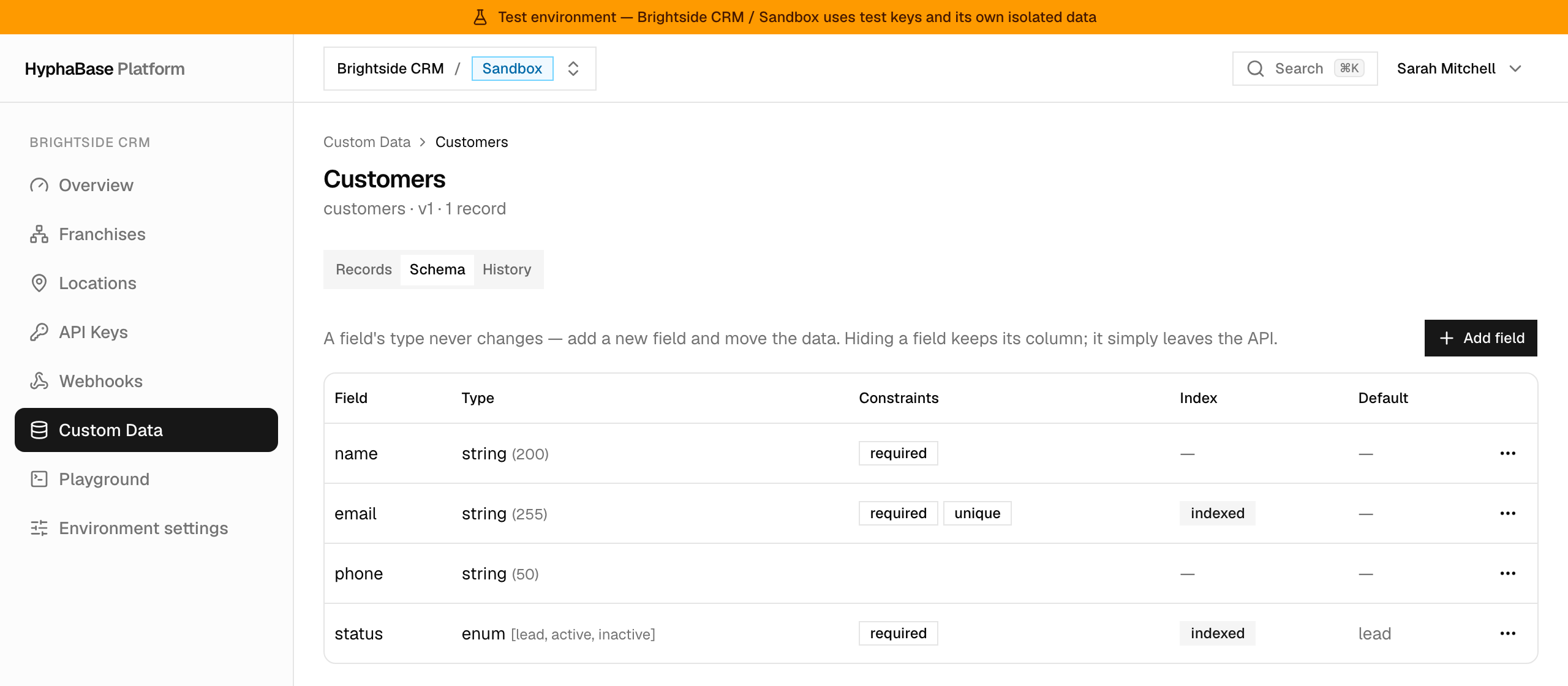
That's four fields with their rules next to them. A name is required. An email is required and unique. A status is one of three values and starts as lead. We don't define the data model anywhere else.
Step 2: create it with one request
The API is plain HTTP and JSON, so in the early episodes we call it with Node's built-in fetch. There's nothing to install. If you take away the repository's small helper, the request looks like this:
const res = await fetch(`${process.env.HYPHABASE_API_URL}/api/modules/data/collections`, {
  method: "POST",
  headers: {
    Accept: "application/json",
    "Content-Type": "application/json",
    Authorization: `Bearer ${process.env.HYPHABASE_SECRET_KEY}`,
  },
  body: JSON.stringify(CUSTOMERS),
});
In the repository this is npm run setup. It checks whether the collection already exists first, so you can run it twice without breaking anything:
$ npm run setup
Created the Customers collection:
  name     string, required
  email    string, required, unique
  phone    string
  status   enum, required, default lead
The collection now shows up in the console under Custom Data, with the same schema we wrote in code.
Step 3: create a record and read it back
Records have their own endpoint, named after the collection's slug:
| Operation | Request |
|---|---|
| Create a customer | POST /api/modules/data/customers/records |
| Read one customer | GET /api/modules/data/customers/records/{id} |
| List customers | GET /api/modules/data/customers/records?sort=-created_at |
The payload is flat. Your fields go at the top level.
const RECORDS = "/api/modules/data/customers/records";

export async function addCustomer(api, customer) {
  const { data } = await api.request(RECORDS, { method: "POST", body: customer });
  return data;
}

export async function getCustomer(api, id) {
  const { data } = await api.request(`${RECORDS}/${encodeURIComponent(id)}`);
  return data;
}

export async function listCustomers(api) {
  const { data } = await api.request(`${RECORDS}?sort=-created_at`);
  return data;
}
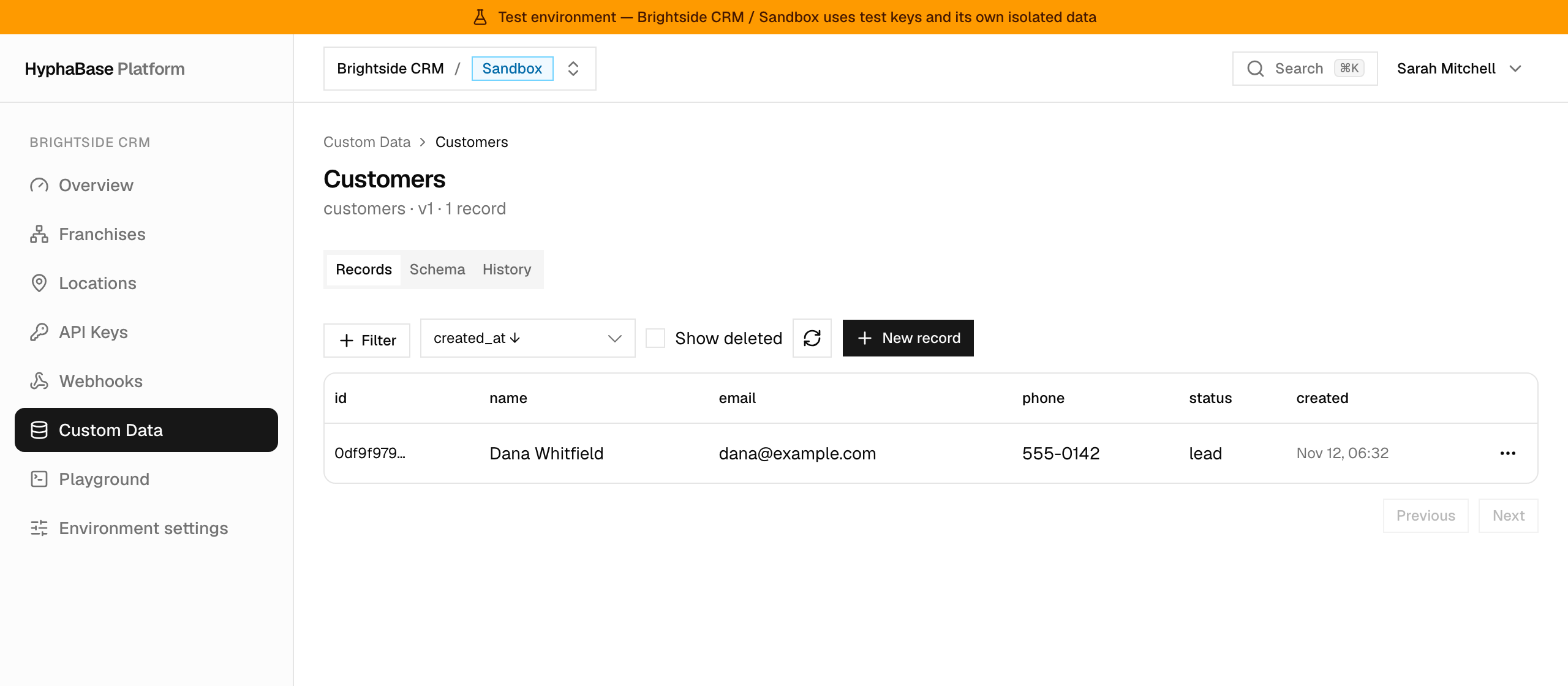
Run it, and our first customer comes back from the API:
$ npm run customer:add
Created customer f294a1f4-3625-49e3-a491-2e9ecc71769e
Read it back from the API:
{
  id: 'f294a1f4-3625-49e3-a491-2e9ecc71769e',
  name: 'Dana Whitfield',
  email: 'dana@example.com',
  phone: '555-0142',
  status: 'lead',
  ...
}
Dana is in the console too.
What the API checks for you
Validation is usually the part that takes longest to write by hand. Here it comes from the field definitions, and you can try each rule yourself.
The script never sends a status, and the record still comes back with status: "lead". That's the default doing its job.
Run npm run customer:add a second time and the request is refused with a 422, because that email is already taken.
Try --status vip and that's refused too, because vip isn't one of the allowed values.
A 422 response lists its messages by field name, so a form can put each error next to the right input.
One rule to know before you design a real collection: a field's type is permanent. You can add, rename and hide fields later, but a string stays a string. That's what keeps old records readable.
Scopes: what this key can and cannot do
The secret key from episode 1 has three scopes: data.collections.manage, data.records.create and data.records.read. That's why this episode stops at create and read. Updating and deleting records are separate scopes, and we left them off this key on purpose. It can do what this episode needs and nothing more.
You can also narrow a scope to one collection. A key with data.records.read:customers reads customers and nothing else. The Custom Data guide lists the field types, filters and scopes.
What this doesn't give you
A working CRUD API isn't a CRM, and there are three limits you should know about.
First, it's server-side only. Custom Data is reached with a secret key, and a secret key should never be sent to a browser or a phone. Your frontend talks to your server, and your server talks to HyphaBase.
Second, there's no login yet. Right now, whoever holds the key can do everything the key allows. Which is slightly concerning for an app that stores customer information. We fix that in the next episode.
Third, your business rules are still yours. Duplicate detection beyond a unique email, imports, activity history and reporting are all real engineering work, and they're specific to your app. We take the repetitive part off your list. The rest is still on it.
Frequently asked questions
What is a CRUD API?
It's an API that lets a client create, read, update and delete records of some resource, usually over HTTP with JSON. In REST terms those map to POST, GET, PATCH or PUT, and DELETE.
Can I build a REST API without writing backend code?
For standard create, read, update and delete operations, yes. With a Backend-as-a-Service you declare the fields and constraints, and the platform gives you the endpoints, validation and storage. You still write the code that's specific to your product.
Is it safe to call this API from the browser?
No. These requests use a secret key, and that belongs on a server. In this series the browser talks to a small server of our own, and a later episode adds a Next.js frontend with the HyphaBase SDK.
How is this different from generating CRUD code with AI or a framework?
Generated code is still code in your repository. You review it, test it and maintain it. Here there's no CRUD code to maintain, and the collection definition is the only thing you own.
Can I change the schema later?
Yes. You can add fields, rename them, hide them, and change which ones are required or indexed. You can't change a field's type. If you need a different type, add a new field and move the data.
Where is the data stored?
In a database that belongs to your app's environment, separate from other apps and environments. Episode 1 compares the isolation models.
Next in the series
Our CRM can store customers now. There's just one fairly important question we haven't answered: who's allowed to see them? In episode 3 we add users and a sign-in, and look at the difference between authentication and authorization.